
Start to Surfaces: From Points and Polygons to Parametric Surfaces
Loading the math board and drawing, please wait…
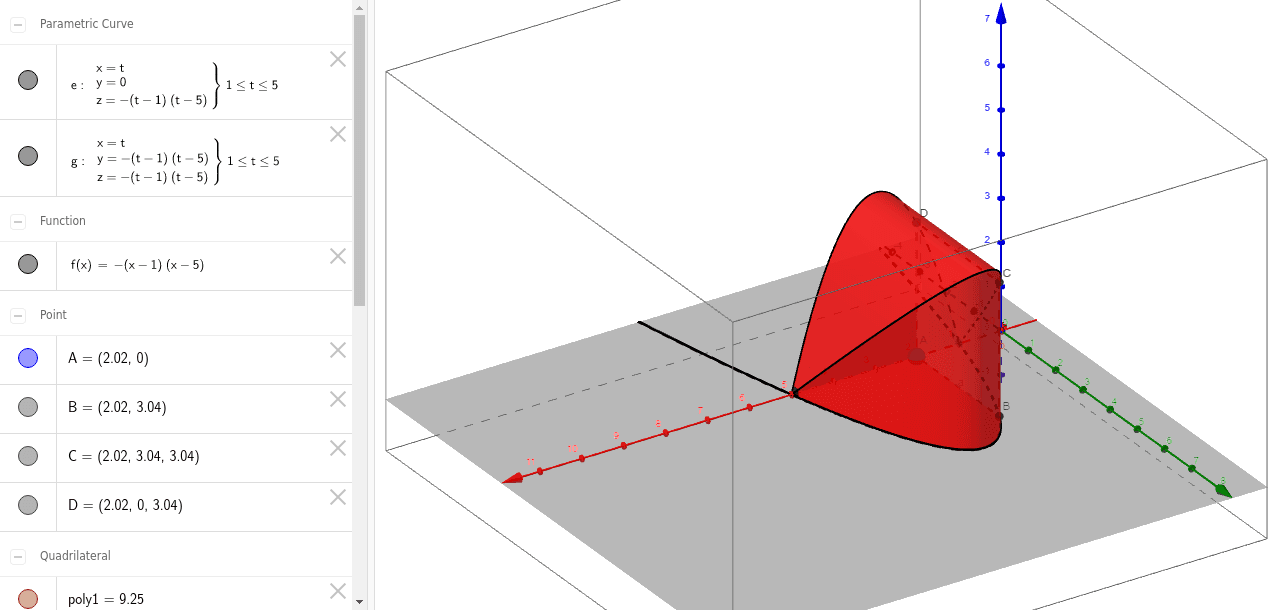
① This example demonstrates how to build a parametric surface step by step from basic geometric elements such as points, line segments, and polygons, offering beginners an intuitive view of surface generation. ② Core mathematical concepts include parametric surfaces, continuity, similar triangles, conditional probability, and expected value, showing an interdisciplinary blend of geometry and probability. ③ Construction highlights: using GeoGebra commands Point (creating A, B, C, D), Polygon (forming poly1), CurveCartesian (drawing parametric curves), and Surface (generating 3D surfaces); objects include f, a, b, c, d, e, g, h, i, j, k, with segments and auxiliary elements bridging 2D and 3D. ④ Suitable for high school to early college students, this serves as a visual teaching aid for solid geometry, parametric equations, and introductory calculus, as well as for math modeling or classroom demonstrations.
GeoGebra Commands & Parameters
Point(Segment[(1, 0), (5, 0)]) → APolygon(A, B, C, D) → poly1, a, b, c, dCurveCartesian(t, 0, f(t), t, 1, 5) → eCurveCartesian(t, f(t), f(t), t, 1, 5) → gSurface(t, ((1 - u) * f(t)), f(t), t, 1, 5, u, 0, 1) → hSurface(t, f(t), ((1 - u) * f(t)), t, 1, 5, u, 0, 1) → iSurface(t, ((1 - u) * f(t)), 0, t, 1, 5, u, 0, 1) → jSurface(t, 0, ((1 - u) * f(t)), t, 1, 5, u, 0, 1) → k
AI Drawing Prompt Reference
Start by creating points A, B, C, D from a line segment, then form a polygon poly1, a, b, c, d. Next, draw parametric curves e and g. Finally, generate parametric surfaces h, i, j, k based on parameters t and u, with f(t) as the core function. These surfaces are interconnected with the curves and polygon, illustrating the combination of geometry and parametric equations.
The prompt above was compiled from the original drawing commands and is for reference only.