
Triangle Cross Section of sqrt(x) Surfaces
Loading the math board and drawing, please wait…
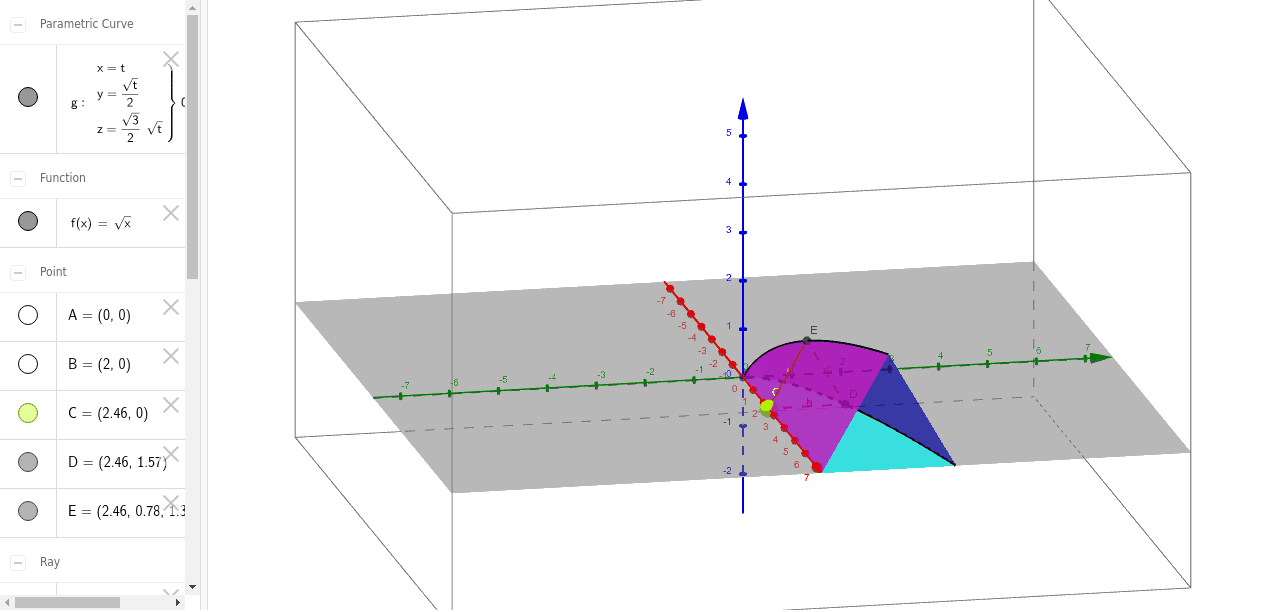
This example demonstrates the triangular cross section of sqrt(x) surfaces. It involves the concept of surfaces in coordinate geometry and how to use GeoGebra to draw surfaces and cross sections. By constructing the triangular cross section, students can understand the geometric meaning of the intersection of a surface and a plane. The example uses commands such as CurveCartesian, Surface, Intersect, Point, Ray, Segment, and Polygon. Suitable for high school mathematics education, particularly in coordinate geometry and solid geometry.
GeoGebra Commands & Parameters
Intersect(f, xAxis, (0, 0)) → APoint(xAxis) → BRay(A, B) → aPoint(a) → CSegment(D, C) → bPolygon(C, D, E) → poly1, e, c, dCurveCartesian(t, f(t) / 2, (sqrt(3) / 2 * f(t)), t, 0, 50) → gSurface(t, ((1 - u) * f(t)), 0, t, 0, 10, u, 0, 1) → iSurface(t, (u * f(t)) + ((1 - u) * f(t) / 2), ((((1 - u) * 0.5) * sqrt(3)) * f(t)), t, 0, 10, u, 0, 1) → jSurface(t, ((1 - u) * f(t) / 2), ((((1 - u) * 0.5) * sqrt(3)) * f(t)), t, 0, 10, u, 0, 1) → k
AI Drawing Prompt Reference
Draw the triangular cross section of the sqrt(x) surface. First, find the intersection point A of the sqrt(x) surface and the x-axis. Then, take point B on the x-axis and draw a ray a through A and B. Next, take point C on ray a and draw line segment b connecting D and C. Then, draw triangle poly1 with vertices C, D, and E. After that, draw curve g, representing a part of the sqrt(x) surface within a specific range. Finally, draw three surfaces i, j, and k, representing the intersection lines of the sqrt(x) surface with planes.
The prompt above was compiled from the original drawing commands and is for reference only.