
SSS Triangle Exploration
Loading the math board and drawing, please wait…
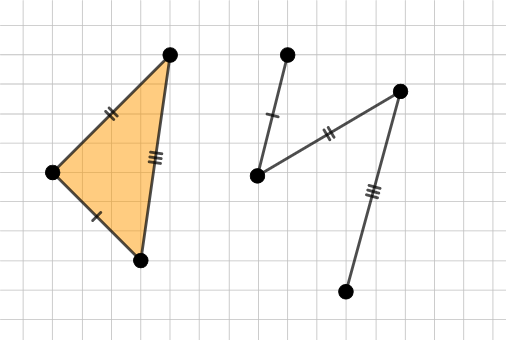
This example demonstrates constructing triangles using three side lengths and exploring the conditions for triangle congruence. Core math concepts include SSS congruence criterion, geometric construction, and trigonometric applications. It uses commands like Circle, Segment, Point, Polygon in GeoGebra. Suitable for high school students learning triangle congruence and geometric transformations.
GeoGebra Commands & Parameters
Circle(A, 2) → cCircle(A, 6) → eSegment(A, F) → mSegment(F, G) → nSegment(G, A) → pPoint(Circle[B, m]) → CSegment(B, C) → fPoint(Circle[C, n]) → DSegment(C, D) → gPoint(Circle[D, p]) → ESegment(D, E) → hPolygon(A, F, G) → t1, g_1, a, f_1Polygon(A, F, G) → t2, g_2, a_1, f_2
AI Drawing Prompt Reference
Using one common center, draw two circles with radii 2 and 6. Choose points on these circles so that the three side lengths of a triangle are determined by the distances from the same center: take one vertex on the radius-2 circle and select the other two vertices as the corresponding points constrained by the circle intersections. Then connect the center to each of the three vertices with line segments to form a triangle. Construct a second triangle formed under the same three side-length constraints for comparison, showing both triangles and the shared radius-distance relationships that enforce the SSS setup.
The prompt above was compiled from the original drawing commands and is for reference only.