
Square Spiral
Loading the math board and drawing, please wait…
In collections
Homothety, Rotation Symmetry -RO
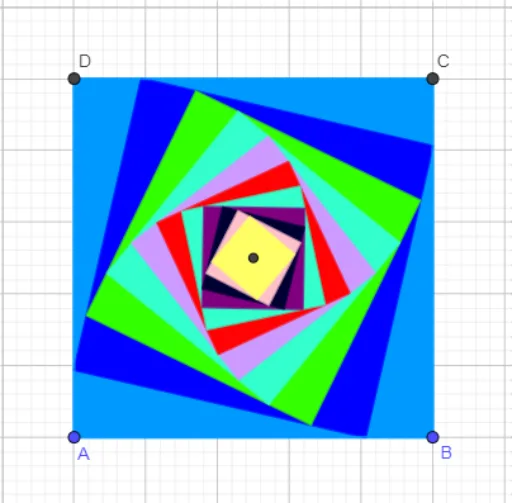
This example demonstrates the generation of a square spiral. It involves concepts of geometric transformations and iteration. Using commands like Polygon, Segment, Dilate, and Rotate, a series of squares are constructed to form the spiral. Suitable for high school mathematics education, particularly in geometry and function graphing.
GeoGebra Commands & Parameters
Polygon(A, B, 4) → poly1, f, g, h, i, C, DSegment(D, B) → jSegment(C, A) → kIntersect(j, k) → EDilate(poly1, 5 / 6, E) → poly1'Rotate(poly1', (-(13°)), E) → poly1''Dilate(poly1'', 5 / 6, E) → poly1'''Rotate(poly1''', (-(13°)), E) → q1Dilate(q1, 5 / 6, E) → q1'Rotate(q1', (-(13°)), E) → q1''Dilate(q1'', 5 / 6, E) → q1'''Rotate(q1''', (-(13°)), E) → q2Dilate(q2, 5 / 6, E) → q2'Rotate(q2', (-(13°)), E) → q2''Dilate(q2'', 5 / 6, E) → q2'''Rotate(q2''', (-(13°)), E) → q3Dilate(q3, 5 / 6, E) → q3'Rotate(q3', (-(13°)), E) → q3''Dilate(q3'', 5 / 6, E) → q3'''Rotate(q3''', (-(13°)), E) → q4Dilate(q4, 5 / 6, E) → q4'Rotate(q4', (-(13°)), E) → q4''Dilate(q4'', 5 / 6, E) → q4'''Rotate(q4''', (-(13°)), E) → q5
AI Drawing Prompt Reference
Draw a square spiral by first creating a square ABCD, then using point E as the rotation center, shrink the square by 1/6 and rotate it 13 degrees counterclockwise, and repeat this process multiple times to form a spiral sequence of squares.
The prompt above was compiled from the original drawing commands and is for reference only.