
Square Root Function Matcher
Loading the math board and drawing, please wait…
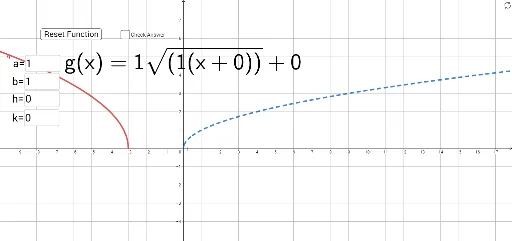
This example demonstrates the process of matching square root functions. Key mathematical concepts include square root functions, parabolas, and calculus. Using GeoGebra commands such as RandomElement, Random, and Textfield, users can dynamically adjust function parameters and observe changes in the function graph. Suitable for high school and above students or teachers.
GeoGebra Commands & Parameters
RandomElement({-2, -1, 1, 2}) → aRandom(-3, 3) → hRandom(-3, 3) → kRandomElement({1, 1, -1}) → bTextfield(a') → InputBox1Textfield(b') → InputBox2Textfield(h') → InputBox3Textfield(k') → InputBox4Textfield(b') → InputBox5
AI Drawing Prompt Reference
Create a square root function matching exercise graph. The figure includes a parabola and its corresponding square root curve, linked by adjustable parameters. Four interactive input boxes are provided to modify the vertical stretch factor, horizontal shift, vertical shift, and the sign of the square root (positive or negative). Initially, these parameters are randomly generated, and users can change the values in the boxes to see how the graph updates. The drawing should clearly show coordinate axes, grid lines, and both curves (one parabola and one square root function), with key points marked to aid matching. The overall style is clean and suitable for classroom demonstration.
The prompt above was compiled from the original drawing commands and is for reference only.