
Square Pyramid: Underlying Anatomy
Loading the math board and drawing, please wait…
In collections
Geometry - Areas and Volumes
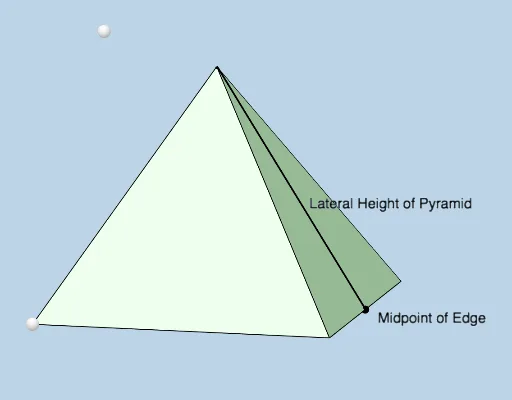
①This example demonstrates the internal anatomy of a modifiable square pyramid, revealing its base, lateral faces, diagonals, midpoints, and perpendicular lines to visualize the geometric structure. ②Core mathematical concepts include the pyramid's apex, square base, lateral edges, triangular faces, diagonals, midpoints, perpendicular (orthogonal) lines, symmetry, and right-triangle relationships, bridging solid and plane geometry. ③Construction highlights: using GeoGebra commands such as Intersect, Point, PointIn, Pyramid, Ray, Segment, Midpoint, Polygon, Angle, and OrthogonalLine, the construction builds multiple faces (e.g., faceACBD, faceACF) and edges (e.g., edgeAD, edgeAC), with adjustable parameters for dynamic exploration. ④Suitable for high school or early college students learning solid geometry, for classroom demonstrations or self-guided exploration of pyramid properties, symmetry, and cross-sections, and as a case study in geometric construction.
GeoGebra Commands & Parameters
Intersect(yAxis, xAxis) → DPoint(zAxis) → EPointIn(c) → FPyramid(D, A, C, B, F) → b, faceACBD_1, edgeDF, edgeAF, edgeCF, edgeBF, faceADF, faceACF, faceBCF, faceBDF, edgeAD_1, edgeAC_1, edgeBC_1, edgeBD_1Ray(G, H) → fPoint(f) → IPoint(edgeCF) → JIntersect(c, f) → KPyramid(A, C, B, D, K) → d, faceACBD, edgeAK, edgeCK, edgeBK, edgeDK, faceACK, faceBCK, faceBDK, faceADK, edgeAC, edgeBC, edgeBD, edgeADSegment(G, K) → hMidpoint(edgeBC) → MSegment(G, M) → jSegment(M, K) → kPolygon(G, M, K) → poly1, k_1, g, mAngle(M, G, K) → αOrthogonalLine(F, e) → iIntersect(i, e) → LSegment(F, L) → lAngle(F, L, A) → βPolygon(K, G, M) → poly2, m_1, k_2, g_1
AI Drawing Prompt Reference
Draw a modifiable square pyramid with its internal anatomy visible. The base is a square, and the apex is above the base. Connect the apex to each corner of the square to form four triangular lateral faces. Draw the two diagonals of the square base and mark their intersection. Pick a point on one lateral edge, then drop a perpendicular from this point to the base plane, marking the foot. Connect the apex, this point, and the foot to form a right triangle, and label its right angle. Also, take the midpoint of one base edge, and connect it to the apex and the diagonal intersection to form another triangle. Use distinct colors for the base, lateral faces, internal auxiliary lines, and the triangular cross-sections.
The prompt above was compiled from the original drawing commands and is for reference only.