
Square and Parallelogram Tiling
Loading the math board and drawing, please wait…
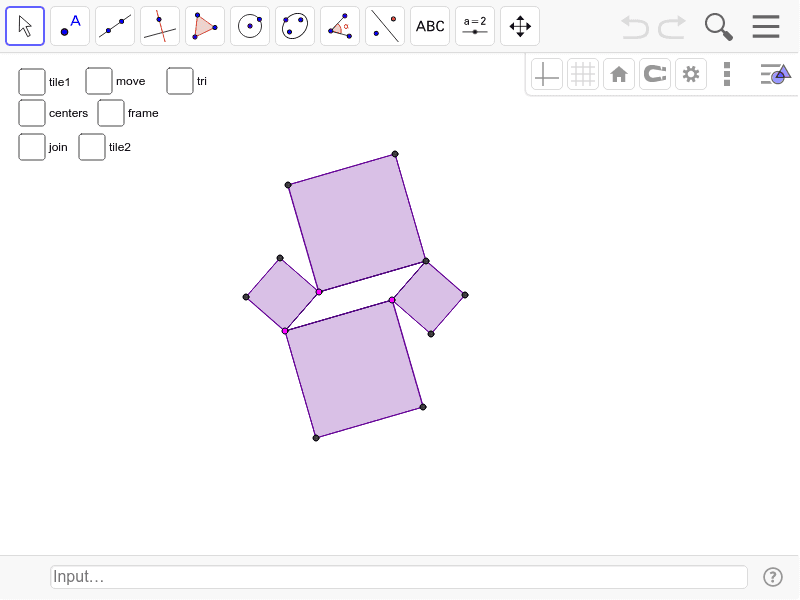
This example demonstrates how squares and parallelograms can tile a plane, forming a complex geometric pattern. It involves core mathematical concepts such as properties of geometric figures, vector operations, coordinate geometry, rotation, and transformation. Key GeoGebra commands used include Segment, Line, Intersect, Polygon, Midpoint, Vector, Sequence, Rotate, and OrthogonalLine. Suitable for high school mathematics education to understand the principles of spatial geometry and transformations.
GeoGebra Commands & Parameters
Segment(A, B) → a_2Segment(A, C) → b_2Line(B, b_2) → c_2Line(C, a_2) → d_2Intersect(c_2, d_2) → DSegment(C, D) → e_2Segment(B, D) → fPolygon(A, C, 4) → poly1, g, h, i, j, E, FPolygon(C, D, 4) → poly2, k, l, m, n, G, HPolygon(D, B, 4) → poly3, p, q, r, s, I, JPolygon(B, A, 4) → poly4, t, a_1, b_1, c_1, K, LMidpoint(F, C) → MMidpoint(G, C) → NMidpoint(J, B) → OMidpoint(K, B) → PVector(E, L) → uVector(K, J) → vSequence(Sequence[Translate[tile1, Vector[(n * u) + (m * v)]], n, -3, 3], m, -3, 3) → list1Polygon(P, O, 4) → poly5, d_1, e_1, f_1, g_1, Q, RRotate(poly5, 90*°, O) → poly5'Rotate(poly5, 180*°, O) → poly5'_1Rotate(poly5, 270*°, O) → poly5'_2OrthogonalLine(M, b_2) → h_1OrthogonalLine(P, a_2) → i_1Intersect(i_1, h_1) → SSegment(M, S) → aSegment(P, S) → bOrthogonalLine(N, e_2) → l_1OrthogonalLine(O, f) → m_1Intersect(l_1, m_1) → TSegment(N, T) → cSegment(O, T) → dSegment(S, T) → eRotate(set1, 90*°, O) → set2Rotate(set1, 180*°, O) → set3Rotate(set1, 270*°, O) → set4Sequence(Sequence[Translate[tile2, Vector[(n * u) + (m * v)]], n, -3, 3], m, -3, 3) → list2Polygon(E, A, L) → poly6, l_2, e_3, a_3Polygon(B, K, J) → poly7, j_2, b_3, k_2
AI Drawing Prompt Reference
Draw a complex geometric pattern tiled by squares and parallelograms, demonstrating how they fill a plane. Start by creating a square, then use vector operations and rotations to generate parallelograms, combining them into a continuous structure. Determine key points using coordinate geometry and vector calculations, construct new shapes with rotations and orthogonal lines, resulting in a symmetrical and layered plane tiling pattern.
The prompt above was compiled from the original drawing commands and is for reference only.