
Spiral Method for Showing Irrational Numbers
Loading the math board and drawing, please wait…
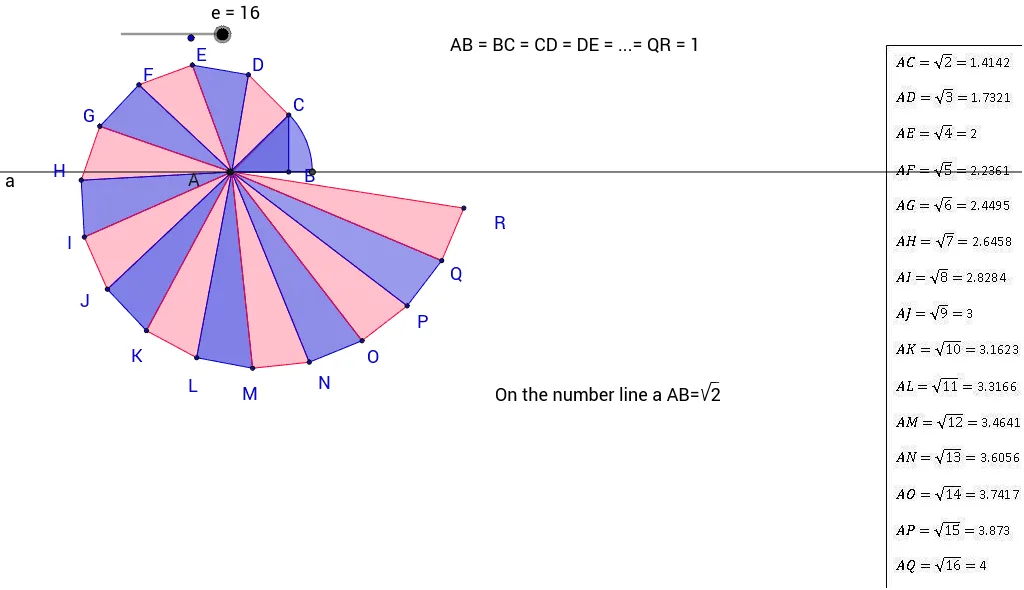
This example demonstrates the spiral method for showing irrational numbers, particularly the 16th root of a number. It involves the concepts of irrational numbers and roots. Using GeoGebra commands such as Outil1, Distance, Line, Circle, etc., a spiral on the number line is constructed to find the 16th root of a specific number. Suitable for students at the junior high school level and above to learn about irrational numbers and roots.
GeoGebra Commands & Parameters
Outil1(A_1, B) → poly1, COutil1(A_1, C) → poly2, DOutil1(A_1, D) → poly3, EOutil1(A_1, E) → poly4, FOutil1(A_1, F) → poly5, GOutil1(A_1, G) → poly6, HOutil1(A_1, H) → poly7, IOutil1(A_1, I) → poly8, JOutil1(A_1, J) → poly9, KOutil1(A_1, K) → poly10, LOutil1(A_1, L) → poly11, MOutil1(A_1, M) → poly12, NOutil1(A_1, N) → poly13, OOutil1(A_1, O) → poly14, POutil1(A_1, P) → poly15, QOutil1(A_1, Q) → poly16, RDistance(A_1, R) → distanceARDistance(A_1, C) → distanceACLine(A_1, B) → aCircle(A_1, 1.4142135623730951) → fIntersect(f, a) → S, TCircleArc(A_1, C, T) → gPoint(a) → ACircleSector(A, T, C) → h
AI Drawing Prompt Reference
On a number line, start from a fixed point and construct a sequence of right triangles in a spiral pattern. Each triangle has one leg equal to the previous hypotenuse and the other leg of unit length. Repeat this process sixteen times, creating a spiral of sixteen right triangles. Then draw a segment from the starting point to the endpoint of the last hypotenuse; its length represents the sixteenth root of the target number. Also mark the distance from the start to the first hypotenuse, draw a circle centered at the start with radius equal to the square root of two, intersecting the number line, and add an arc from the start to that intersection, plus a sector, to illustrate the geometric construction.
The prompt above was compiled from the original drawing commands and is for reference only.