
Card-Based Visualization of a Probability Distribution
Loading the math board and drawing, please wait…
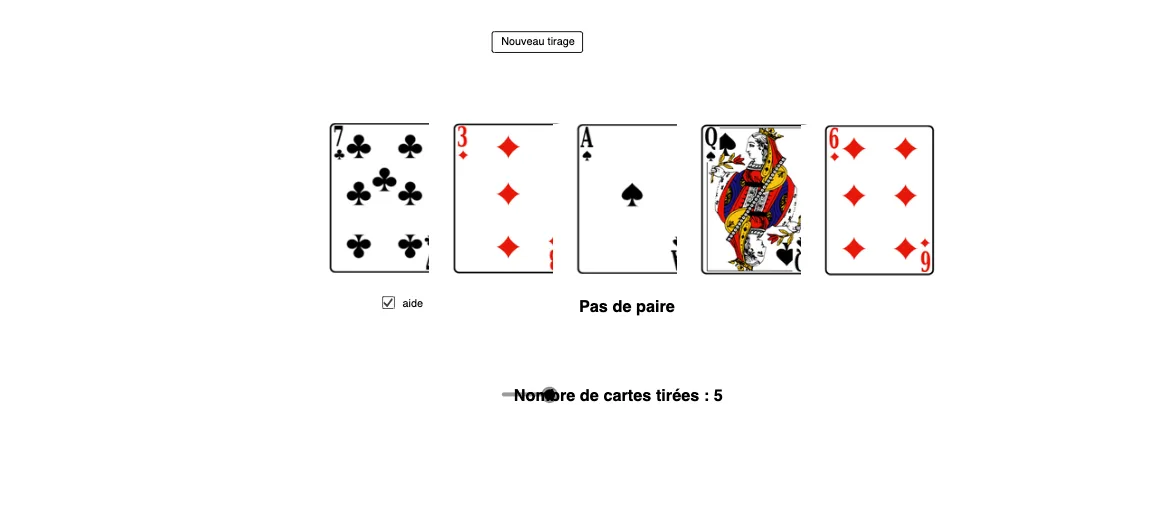
This example demonstrates how to visualize a discrete probability distribution using a “cards/segments” style construction, mapping the same distribution to different geometric layouts such as bar-like and sector/circle-based representations. The key math ideas are discrete probability distribution, allocation/counting with normalization (reflected by vector constructions and summations), and step functions (piecewise constant behavior) to represent probability masses. Construction highlights from the GeoGebra command summary: Sequence generates ordered items; Element selects referenced components; KeepIf filters items using conditions; Mod supports cyclic indexing to distribute cards according to the rule; Sum aggregates the relevant quantities; Vector together with Translate positions the generated “cards” in the plane; and the layout is further connected to rotation/sector/circle visualization in the scene. Suitable for high school through early university learning, especially for teaching discrete probability concepts and using GeoGebra to combine probability with geometric transformations and step-function graphs.
GeoGebra Commands & Parameters
Sequence(Random[1, 52 - k], k, 0, n - 1) → liste1Sequence(k, k, 1, 52) → liste2Element(liste1, 1) → carte1KeepIf(x ≠ carte1, liste2) → liste3Element(liste3, Element[liste1, 2]) → carte2KeepIf(x ≠ carte2, liste3) → liste4Element(liste4, Element[liste1, 3]) → carte3KeepIf(x ≠ carte3, liste4) → liste5Element(liste5, Element[liste1, 4]) → carte4Mod(carte1, 13) → A1Mod(carte2, 13) → B1Mod(carte3, 13) → C1Mod(carte4, 13) → D1Sum(B3:B8) → B9Element(cartes, carte1) → Cart1Vector(A, B) → uTranslate(Element[cartes, carte2], u) → Cart2Translate(Element[cartes, carte3], Vector[(2 * u)]) → Cart3Translate(Element[cartes, carte4], Vector[(3 * u)]) → Cart4KeepIf(x ≠ carte4, liste5) → liste6Element(liste6, Element[liste1, 5]) → carte5Translate(Element[cartes, carte5], Vector[(4 * u)]) → Cart5Mod(carte5, 13) → E1Sum(F3:F12) → F13
AI Drawing Prompt Reference
Create a discrete probability distribution visualization using card-like elements. Generate a sequence of 52 cards, then select four cards in order, with each card's suit represented by the remainder when divided by 13. Translate these cards sequentially on the plane with a vector u between them. Finally, calculate and display the count of each suit.
The prompt above was compiled from the original drawing commands and is for reference only.