
Spinner (2 to 12 sections) V1: Dynamic Segmented Circle Animation
Loading the math board and drawing, please wait…
In collections
Probability & Intro. to Stat.
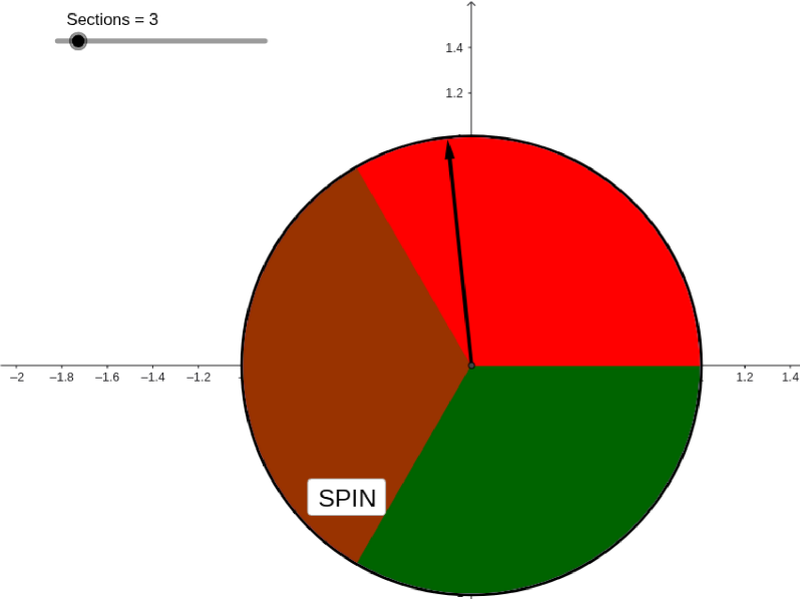
This example demonstrates how to create a dynamic segmented circle animation to illustrate probability and geometric relationships. Key mathematical concepts include probability, circular angles, function graphs, and geometric construction. The construction involves using GeoGebra commands such as Intersect, Circle, CircleSector, and Random to create an interactive Spinner object. Suitable for middle school students learning interactive geometry and probability exercises, and high school students exploring function and geometric transformation applications.
GeoGebra Commands & Parameters
Intersect(xAxis, yAxis) → ACircle(A, 1) → cCircleSector(A, B, C) → dCircleSector(A, C, D) → eCircleSector(A, D, E) → fCircleSector(A, E, F) → gCircleSector(A, F, G) → hCircleSector(A, G, H) → kCircleSector(A, H, I) → pCircleSector(A, I, J) → qCircleSector(A, J, K) → rRandom(0, 359) → EXCircleSector(A, K, L) → sCircleSector(A, L, M) → tCircleSector(A, M, B) → c_1Text(Value) → text1Random(1, 2) → laps
AI Drawing Prompt Reference
Create a dynamic spinner with 12 sectors representing numbers from 2 to 12. Use a random number generator to create multiple sectors, each representing the probability of a number. Finally, display the randomly selected number.
The prompt above was compiled from the original drawing commands and is for reference only.