
Spherical Kite
Loading the math board and drawing, please wait…
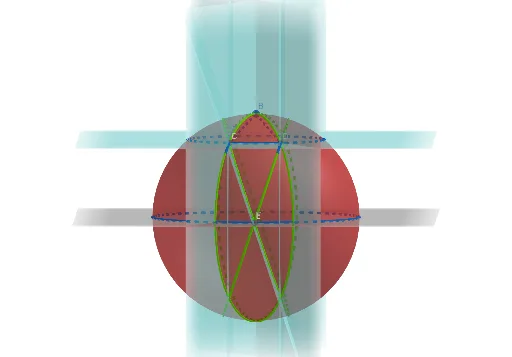
This example demonstrates a kite on a sphere. Key mathematical concepts include spherical geometry and polygons. Using commands such as Intersect, Point, Sphere, Plane, IntersectPath, and Polygon, the construction of a spherical kite is illustrated. Suitable for high school students and math enthusiasts to learn about spherical geometry and polygons.
GeoGebra Commands & Parameters
Intersect(yAxis, zAxis) → APoint(zAxis) → BSphere(A, B) → aPlane(x = 1) → cPlane(x = -1) → bPlane(z = 3) → dIntersectPath(d, b) → fIntersectPath(c, d) → gIntersectPath(d, a) → eIntersectPath(xOyPlane, a) → hIntersect(f, a, 1) → CIntersect(g, a, 2) → DIntersect(yAxis, h, 2) → EPolygon(B, C, E, D) → q1, b_1, c_1, e_1, d_1Plane(B, C, A) → iPlane(B, D, A) → jIntersectPath(i, a) → kIntersectPath(j, a) → pPlane(A, E, C) → lPlane(A, E, D) → mIntersectPath(l, a) → qIntersectPath(m, a) → r
AI Drawing Prompt Reference
Draw a spherical kite. Start by marking the intersection points of two perpendicular axes as the center of a sphere. Then, draw four specific planes and use their intersections with the sphere to construct the kite's four vertices. Finally, connect these vertices to form a kite shape.
The prompt above was compiled from the original drawing commands and is for reference only.