
Special Right Triangle Ratios by Mark Kaercher
Loading the math board and drawing, please wait…
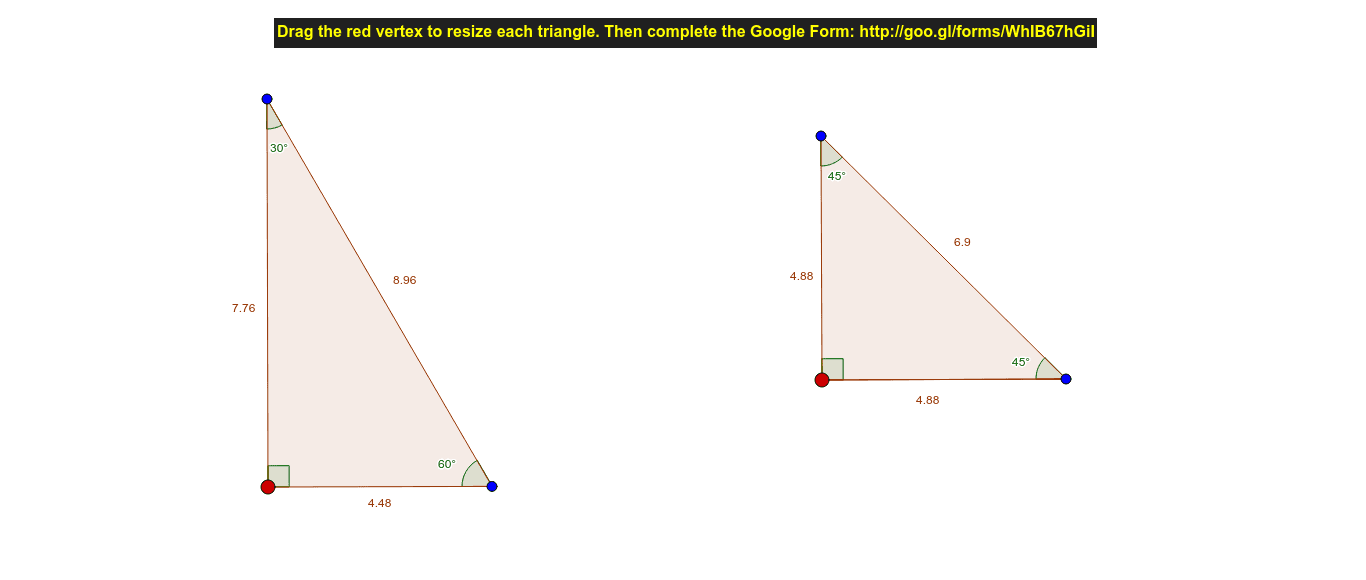
This example demonstrates the ratio relationships in special right triangles. Key mathematical concepts include trigonometry and geometric construction. Using GeoGebra commands such as Segment, Rotate, Angle, and Line, the construction of right triangles and observation of their side ratios are illustrated. Suitable for middle school and above students to learn trigonometry and geometric construction.
GeoGebra Commands & Parameters
Segment(A, B) → aRotate(B, 90°, A) → B'Angle(B, A, B') → αLine(A, B') → bRotate(A, 30°, B') → A'Angle(A, B', A') → βLine(B', A') → cIntersect(c, a) → CAngle(B', C, A) → γPolygon(B', A, C) → poly1, c_1, b', a_1Segment(D, E) → dRotate(D, 90°, E) → D'Angle(D, E, D') → δLine(E, D') → eRotate(E, 45°, D') → E'Angle(E, D', E') → εLine(D', E') → fPolygon(D', E, D) → poly2, d_1, d', e_1Angle(D', D, E) → ζ
AI Drawing Prompt Reference
Draw a right triangle, then construct another right triangle through rotation and angles. First, draw a line segment AB, then rotate point B 90 degrees clockwise around point A to get B', and draw line segment AB'. Next, rotate point A 30 degrees clockwise around point B' to get A', and draw line segment B'A' which intersects AB at point C, forming a right triangle AB'C. Then, draw a line segment DE, rotate point D 90 degrees clockwise around point E to get D', and draw line segment ED'. Finally, rotate point E 45 degrees clockwise around point D' to get E', and draw line segment D'E' which intersects DE at point F, forming a right triangle DEF.
The prompt above was compiled from the original drawing commands and is for reference only.