
Special Powers
Loading the math board and drawing, please wait…
In collections
Rechnen mit Potenzen
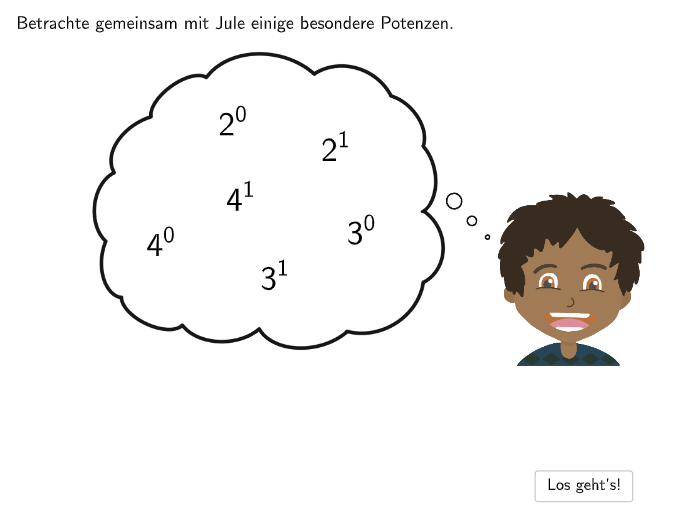
This example demonstrates the calculation of special powers through multiple-choice and open-ended questions. Key mathematical concepts include the rules of power operations. Various GeoGebra commands such as Textfield, Sequence, Join, etc., are used. Suitable for 7-8th grade students to learn the rules of power operations.
GeoGebra Commands & Parameters
Textfield(input1) → InputBox1Textfield(input2) → InputBox2Textfield(input3) → InputBox3Textfield(input4) → InputBox4SpeechBubbleRight(A, 11, 1.8) → Speech1Sequence(B + ((dfx * i), 0), i, 0, size, 1) → Layer1PointsSequence(D + ((dfx * i), 0), i, 0, size, 1) → Layer3PointsSequence(C + ((dfx * i), 0), i, 0, size, 1) → Layer2PointsJoin({{Segment[C, Layer2Points(Length[Layer2Points])], Segment[B, Layer1Points(Length[Layer1Points])]}, Sequence[Segment[Layer1Points(i), Layer2Points(i)], i, 1, Length[Layer1Points], 1]}) → Kanten1Translate(Layer1Points, (Length[Vector[B, Layer1Points(2)] / 2], -0.2)) → BogenUntenStartEndListTranslate(Layer1Points, (Length[Vector[B, Layer1Points(2)]], -0.2 - Length[Vector[B, Layer1Points(2)] / 2])) → BogenUntenMidListJoin({{Segment[C, Layer2Points(Length[Layer2Points])], Segment[D, Layer3Points(Length[Layer3Points])]}, Sequence[Segment[Layer3Points(i), Layer2Points(i)], i, 1, Length[Layer1Points], 1]}) → Kanten2Textfield(input5) → InputBox5Textfield(inputText) → Eingabefeld1SpeechBubbleRight(A, 8.4, 1.8) → Speech2Translate(Layer3Points, (Length[Vector[B, Layer1Points(2)] / 2], 0.2)) → BogenObenStartEndListTranslate(Layer3Points, (Length[Vector[B, Layer1Points(2)]], 0.2 + Length[Vector[B, Layer1Points(2)] / 2])) → BogenObenMidListText(Div2Text, BogenObenMidList(4) + (0, 0.5), false, true, 0, 0) → Text12Text(Div2Text, BogenObenMidList(3) + (0, 0.5), false, true, 0, 0) → Text13Text(Div2Text, BogenObenMidList(1) + (0, 0.5), false, true, 0, 0) → Text15Text(Div2Text, BogenObenMidList(2) + (0, 0.5), false, true, 0, 0) → Text14Textfield(input6) → InputBox6Sequence(Text[Mult2Text, BogenUntenMidList(i) + (0, -0.25), false, true, 0, 0], i, 1, 4, 1) → Mult2BeschSpeechBubbleRight(A, 8.4, 1.8) → Vieleck1If(step < 8, 8 - step - 1, 0) → inputsolSequence(CircumcircleArc[BogenUntenStartEndList(i), BogenUntenMidList(i) + (-0.3, 0), BogenUntenStartEndList(i + 1) + (-0.3, 0)], i, 1, 4, 1) → Mult2BogenSequence(BogenUntenStartEndList(i) + (-0.3, 0), i, 2, 5, 1) → Mult2PfeileCircumcircleArc(BogenObenStartEndList(5), BogenObenMidList(4), BogenObenStartEndList(4) + (0.3, 0)) → BogenOben1CircumcircleArc(BogenObenStartEndList(4), BogenObenMidList(3), BogenObenStartEndList(3) + (0.3, 0)) → BogenOben2CircumcircleArc(BogenObenStartEndList(3), BogenObenMidList(2), BogenObenStartEndList(2) + (0.3, 0)) → BogenOben3CircumcircleArc(BogenObenStartEndList(2), BogenObenMidList(1), BogenObenStartEndList(1) + (0.3, 0)) → BogenOben4
AI Drawing Prompt Reference
On a coordinate plane, place several input boxes for a multi-choice style task. Construct three related layers of equally spaced points by drawing a bottom layer and a middle layer, then connect adjacent points on each layer to form boundary segments. Build a second (upper) point layer with its own adjacent connections, and between the upper and middle layers connect corresponding points to create continuous slanted edges. Using the endpoints of each adjacent pair, draw four circular arcs on the lower boundary and four circular arcs on the upper boundary, with the arc middle points guided by the chosen point-layer positions. Add four small labels near the upper arcs and include right-side speech bubbles to prompt the student to apply the power-operation rules.
The prompt above was compiled from the original drawing commands and is for reference only.