
Spaghetti Unit Circle: Rotation-Based Trig Geometry
Loading the math board and drawing, please wait…
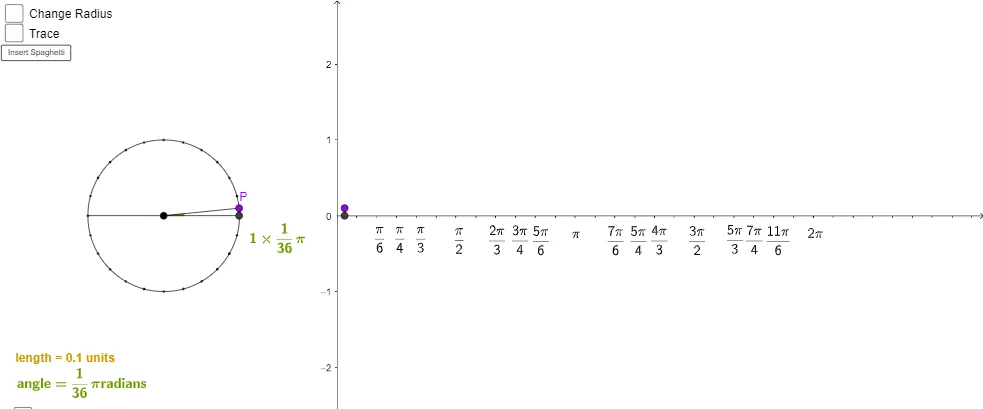
This example visualizes the unit circle by repeatedly rotating and connecting key points, producing a “spaghetti-like” curve on or around the circle to demonstrate how angles correspond to coordinates. It highlights core ideas such as the unit circle, the relationship between real angles and points on the circle, and how trigonometric quantities (sine/cosine read from point coordinates) emerge geometrically. Construction details include using GeoGebra commands Point and Circle to create the center, radius, and initial points; Intersect to compute intersections; Rotate to generate multiple rotated points; Segment and Angle to draw and annotate connecting segments and angles; OrthogonalLine plus Distance to drop perpendiculars and measure lengths; CircleArc to show arcs; AngularBisector to visualize angle-bisecting structure; and FractionText for readable labeled ratios/values. Suitable for high school through early college lessons on trigonometry, dynamic geometry, and geometric construction with GeoGebra.
GeoGebra Commands & Parameters
Point(xAxis) → ACircle(A, zradius) → cIntersect(c, xAxis) → Z, DRotate(D, 15°, A) → D'Rotate(D', 15°, A) → D''Rotate(D'', 15°, A) → D'''Rotate(D''', 15°, A) → ERotate(E, 15°, A) → E'Rotate(E', 15°, A) → E''Point(c) → BSegment(A, B) → aSegment(Z, D) → bAngle(D, A, B) → αOrthogonalLine(B, b) → dIntersect(d, b) → CSegment(B, C) → eDistance(B, C) → distanceBESegment((0, 0), (0, 0)) → tSegment(F, G) → fRotate(E'', 15°, A) → E'''Rotate(E''', 15°, A) → HRotate(H, 15°, A) → H'Rotate(H', 15°, A) → H''Rotate(H'', 15°, A) → H'''Rotate(H''', 15°, A) → IRotate(I, 15°, A) → I'Rotate(I', 15°, A) → I''Rotate(I'', 15°, A) → I'''Rotate(I''', 15°, A) → JRotate(J, 15°, A) → J'Rotate(J', 15°, A) → J''Rotate(J'', 15°, A) → J'''Rotate(J''', 15°, A) → KRotate(K, 15°, A) → K'Rotate(K', 15°, A) → K''Rotate(K', 15°, A) → K''_1Rotate(K'', 15°, A) → K'''CircleArc(A, D, B) → hAngularBisector(D, A, B) → iIntersect(h, i) → L,FractionText(floor((36 * x(F) / π) + 0.5) / 36) → xcoordFRAC
AI Drawing Prompt Reference
Draw a unit circle and place multiple points evenly on it. Rotate these points in increments and connect them to form a 'spaghetti-like' curve around the circle, illustrating the correspondence between angles and coordinates. Label the unit circle, angles, rotated points, and connecting segments, and include perpendiculars, arcs, and angle bisectors, with fractional text annotations for key lengths and ratios to geometrically demonstrate trigonometric concepts.
The prompt above was compiled from the original drawing commands and is for reference only.