
Solving Systems of Linear Equations via Graphical Intersection
Loading the math board and drawing, please wait…
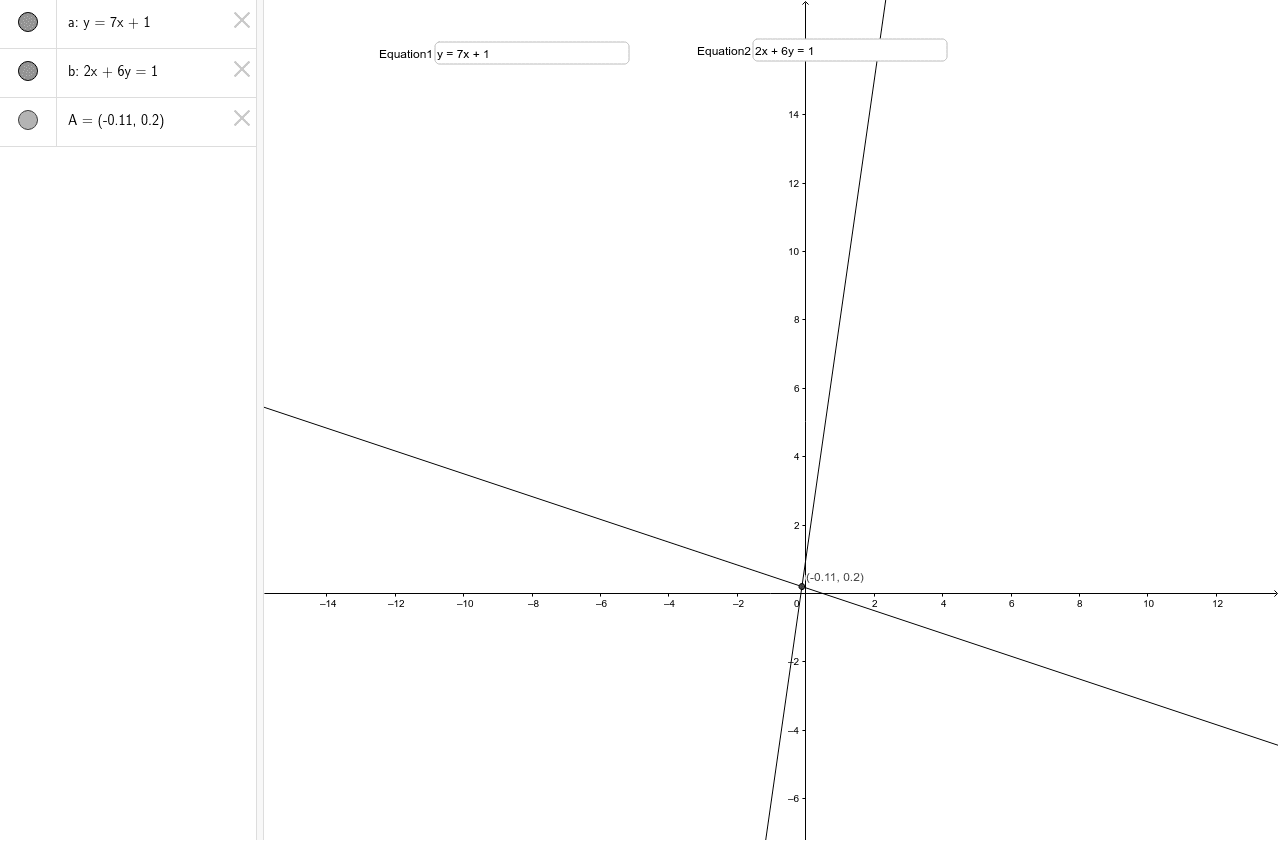
This GeoGebra example demonstrates solving systems of linear equations graphically. It covers core concepts such as linear equations, lines intersection, and the relationship between algebraic solutions and geometric points. Construction involves using Textfield objects for Equation1 and Equation2 inputs, and the Intersect command to find point A. Suitable for middle or high school students to visualize the connection between algebra and geometry, enhancing understanding of linear systems.
GeoGebra Commands & Parameters
Textfield(a) → Equation1Textfield(b) → Equation2Intersect(a, b) → A
AI Drawing Prompt Reference
Draw two lines based on user-input linear equations and mark their intersection point in the coordinate system. Label the lines and the intersection point with their respective equations and coordinates to visually demonstrate how the solution to a system of linear equations corresponds to the geometric intersection point, aiding in understanding the connection between algebra and geometry.
The prompt above was compiled from the original drawing commands and is for reference only.