
Solving Quadratic Equations Using Inverse Operations and Null Factor Law
Loading the math board and drawing, please wait…
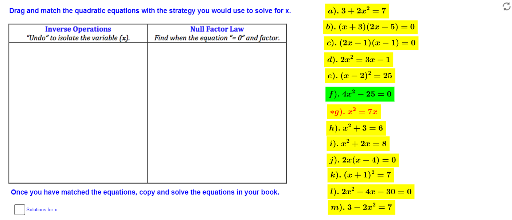
This GeoGebra example demonstrates how to solve quadratic equations step by step using inverse operations and the null factor law. It visually presents the solution process with interactive text and graphics. The core mathematical concepts include the standard form of quadratic equations, factoring, the null factor law (if ab=0 then a=0 or b=0), and inverse operations such as taking square roots and transposing terms. The construction uses numerous text objects (text1, text1_1, etc.) to display each step, along with picture objects (pic1, pic2) for visual aids, and a parameter 'a' likely allows dynamic adjustment of the equation coefficients. This resource is suitable for middle school to high school students learning algebra, and can be used for classroom demonstrations or self-paced exploration of solving quadratic equations.
GeoGebra Commands & Parameters
Boolean a(false)
AI Drawing Prompt Reference
Please draw a graphic that demonstrates the solving process of quadratic equations. The graphic should include the standard form of a quadratic equation, such as ax^2+bx+c=0, and step-by-step solving steps. Key objects should include the equation expression, text explanations of solving steps, graphical representations of solutions (like roots), and a parameter 'a' for dynamic adjustment of coefficients. The construction order should start from the equation and gradually show the application of inverse operations and the null factor law, ensuring the graphic is clear and easy to understand for middle school students.
The prompt above was compiled from the original drawing commands and is for reference only.