
Solving Linear Equations of the form ax+b=c
Loading the math board and drawing, please wait…
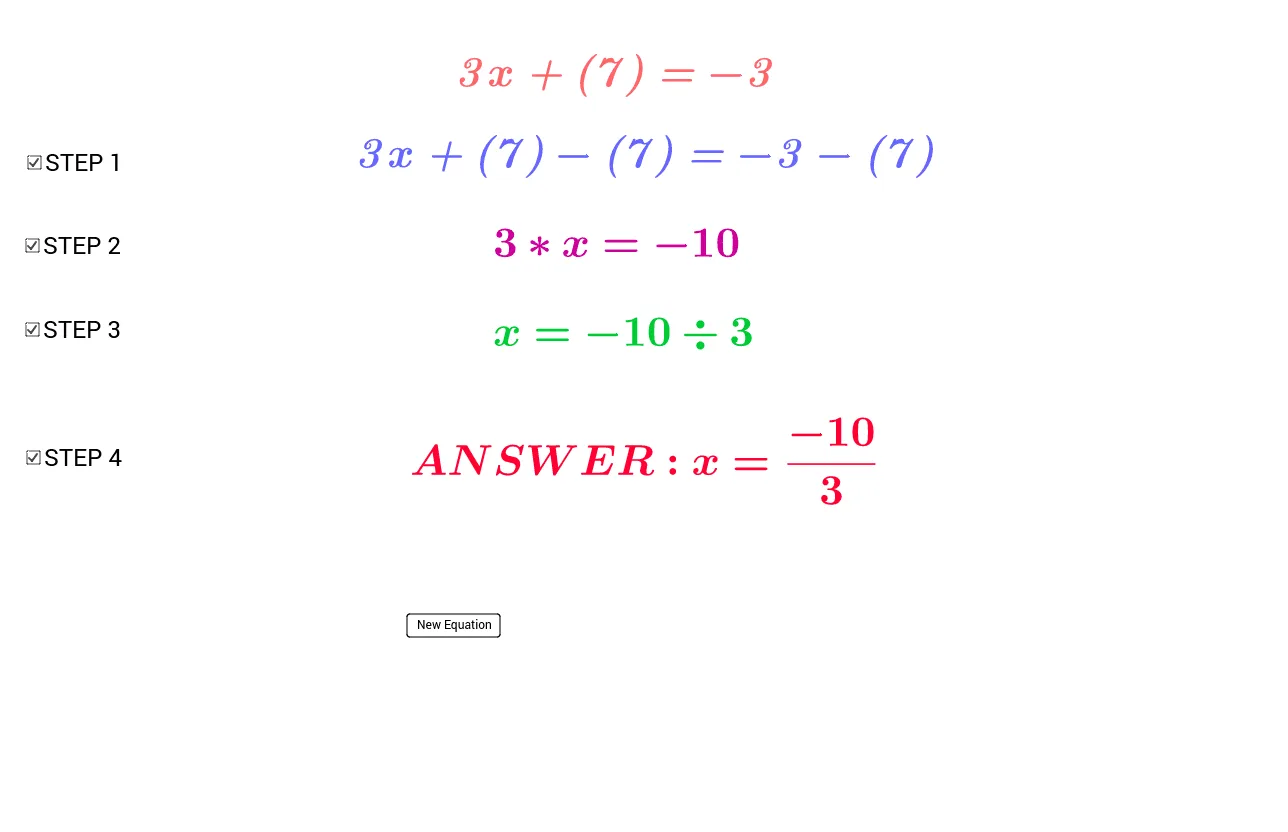
This example demonstrates the solving process of linear equations in the form ax+b=c. Core math concepts include equation solving, linear equations, and algebraic operations. It utilizes GeoGebra commands like Element, Random, FractionText, and objects such as list, a, m, c, button1, step1, text3, text4, step4, text1, text2, d, e, f, g, h, i, s1, s2, s3, s4, text5, text6, b, j. Suitable for middle school mathematics education, helping students understand and master the steps of solving linear equations.
GeoGebra Commands & Parameters
Element(list, Random[1, 8]) → aRandom(-10, 10) → mRandom(-10, 10) → cFractionText(step1 / a) → step4Random(-4, -1) → bRandom(1, 4) → j
AI Drawing Prompt Reference
Draw a coordinate plane to demonstrate the solving process of linear equations ax+b=c. Randomly generate coefficients a, slope m, and constant term c, then plot the corresponding line y=mx+c. Show the steps, including transforming the equation to x=(c-b)/a, and label key variables and calculation results.
The prompt above was compiled from the original drawing commands and is for reference only.