
Solving Equations with Variables on Both Sides
Loading the math board and drawing, please wait…
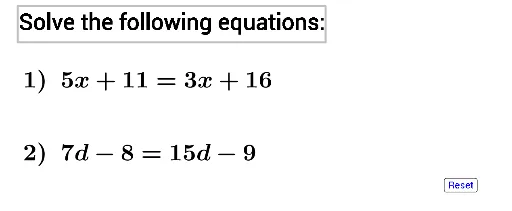
This example demonstrates solving equations with variables on both sides. Key mathematical concepts include solving equations and the technique of moving terms. The example uses the Random command in GeoGebra to generate random equations and includes text and button objects for interaction. Suitable for students in middle school and above to learn methods of solving equations.
GeoGebra Commands & Parameters
Random(2, 9) → aRandom(11, 20) → dRandom(11, 20) → bRandom(2, 9) → cRandom(2, 9) → eRandom(-9, -2) → fRandom(2, 9) → gRandom(-9, -2) → h
AI Drawing Prompt Reference
Create an educational diagram for solving equations with variables on both sides. Center a randomly generated linear equation with variable terms and constants on both sides. Above the equation, place a title reading 'Variables on Both Sides'. Below, add two interactive buttons labeled 'New Equation' and 'Show Steps'. Use a coordinate grid as background to emphasize function and coordinate geometry. Keep the design clean and clear for middle school students to observe equation structure and understand moving terms.
The prompt above was compiled from the original drawing commands and is for reference only.