
Solve the Number Puzzle
Loading the math board and drawing, please wait…
In collections
Wiederholung: Variablen, Terme und Gleichungen
Gleichungen lösen mit Umkehroperationen
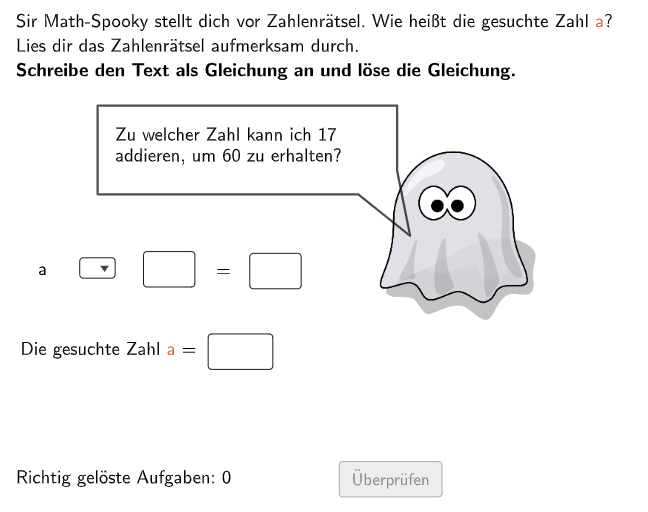
This example demonstrates how to construct and solve mathematical puzzles using GeoGebra. The core math concepts involved include setting up equations and applying linear equations in real-world situations. GeoGebra commands such as Textfield, Shuffle, Element, Random, If, SelectedIndex, Polygon, SpeechBubbleRight are utilized. Suitable for students in grades 5-6 to practice and reinforce math skills.
GeoGebra Commands & Parameters
Textfield(aInput) → InputBox1Shuffle(Sequence[Random[1, 25], i, 1, 100]) → randomNos4, {12, 9, 11, 14, 7, 12, 1, 7, 9, 23, 3, 15, 25, 12, 24, 9, 5, 14, 11, 25, 14, 10, 25, 7, 6, 25, 12, 20, 3, 16, 25, 2, 23, 24, 12, 3, 15, 3, 14, 1, 2, 5, 12, 11, 16, 14, 2, 11, 4, 11, 1, 25, 17, 22, 1, 19, 13, 12, 24, 2, 16, 14, 9, 19, 23, 18, 8, 20, 7, 13, 10, 9, 11, 11, 20, 9, 7, 7, 7, 10, 14, 24, 13, 14, 9, 1, 20, 16, 11, 10, 19, 7, 16, 9, 10, 2, 22, 10, 9, 23}Element(randomNos4, Mod[count, 100] + 1) → num2yRandom(2, floor(100 / num2y)) → num2aShuffle(Sequence[Random[1, 99], i, 1, 100]) → randomNos3, {30, 69, 80, 20, 30, 1, 10, 56, 91, 17, 40, 98, 11, 64, 73, 90, 66, 83, 64, 59, 67, 53, 13, 97, 35, 3, 65, 5, 51, 54, 6, 18, 61, 68, 93, 88, 85, 25, 62, 38, 67, 38, 29, 30, 85, 50, 89, 9, 54, 18, 7, 24, 26, 66, 98, 29, 94, 97, 18, 94, 60, 11, 37, 85, 70, 7, 17, 28, 93, 79, 19, 7, 75, 51, 42, 12, 16, 72, 32, 46, 39, 66, 72, 54, 23, 57, 93, 60, 11, 81, 22, 51, 72, 95, 78, 19, 58, 86, 16, 60}Element(randomNos3, Mod[count, 100] + 1) → numzShuffle(Sequence[Random[1, 99], i, 1, 100]) → randomNos2, {49, 79, 59, 84, 49, 62, 18, 85, 64, 60, 36, 22, 56, 88, 86, 6, 67, 93, 93, 79, 21, 45, 7, 39, 54, 11, 87, 39, 15, 26, 67, 77, 20, 59, 54, 28, 98, 9, 24, 83, 92, 11, 19, 31, 95, 5, 7, 34, 30, 46, 3, 82, 45, 37, 87, 57, 37, 60, 94, 42, 90, 46, 64, 35, 41, 45, 65, 61, 65, 33, 38, 63, 35, 72, 64, 53, 94, 7, 99, 13, 26, 59, 95, 31, 15, 37, 2, 2, 89, 16, 78, 88, 28, 37, 67, 42, 45, 62, 15, 98}Element(randomNos2, Mod[count, 100] + 1) → numyIf(numz > numy, numz, numy) → chosenzIf(numz > numy, numy, numz) → chosenySelectedIndex(rechenzeichen) → selectedIndexPolygon(PtopLeftCornerFeedback, PtopRightCornerFeedback, PbottomRightCornerFeedback, PbottomLeftCornerFeedback) → rectangleCorrect, ptopleftcornerfeedback, ptoprightcornerfeedback, pbottomrightcornerfeedback, pbottomleftcornerfeedbackShuffle(Sequence[Random[1, 99], i, 1, 100]) → randomNos1, {10, 85, 95, 98, 92, 3, 54, 18, 70, 1, 76, 50, 6, 24, 22, 26, 32, 62, 58, 65, 22, 24, 93, 80, 71, 89, 1, 90, 13, 26, 65, 23, 90, 77, 62, 84, 42, 69, 99, 38, 48, 79, 39, 7, 64, 19, 46, 24, 83, 53, 27, 50, 78, 75, 34, 46, 46, 44, 83, 2, 33, 65, 47, 64, 29, 73, 81, 12, 55, 94, 32, 20, 89, 19, 4, 59, 49, 30, 80, 23, 32, 40, 6, 14, 58, 16, 22, 39, 98, 25, 19, 70, 44, 57, 99, 14, 19, 16, 5, 87}Element(randomNos1, Mod[count, 100] + 1) → numaSpeechBubbleRight((2.1, 4.5), 4, 1) → poly1Polygon(PtopLeftCornerFeedback_{1}, PtopRightCornerFeedback_{1}, PbottomRightCornerFeedback_{1}, PbottomLeftCornerFeedback_{1}) → rectangleCorrect_{1}, ptopleftcornerfeedback_{1}, ptoprightcornerfeedback_{1}, pbottomrightcornerfeedback_{1}, pbottomleftcornerfeedback_{1}Textfield(eInput) → InputBox2Textfield(fInput) → InputBox3Textfield(gInput) → InputBox4If(questionShuffel ≟ 1, cor1, If[questionShuffel ≟ 2, cor2, If[questionShuffel ≟ 3, cor3, If[questionShuffel ≟ 4, cor4, If[questionShuffel ≟ 5, cor5, If[questionShuffel ≟ 6, cor6, If[questionShuffel ≟ 7, cor7, cor8]]]]]]) → gleichung
AI Drawing Prompt Reference
Create a “number puzzle” geometry scene. First generate several random integers to serve as the puzzle’s number pool, then derive two candidate values, select which one to use by comparing them, and combine the chosen values into a displayed equation. Construct a main rectangle by specifying four corner points, then place an additional rectangle of the same kind to represent feedback/correction at the corresponding corner positions. Add input text boxes near the rectangles for the user to enter equation-related values, and include a right-side speech-bubble style marker to guide solving. Finally, render the equation as visible text derived from the selected numbers, keeping the overall layout centered around the rectangle area.
The prompt above was compiled from the original drawing commands and is for reference only.