
SOHCAHTOA Unit Circle Demo
Loading the math board and drawing, please wait…
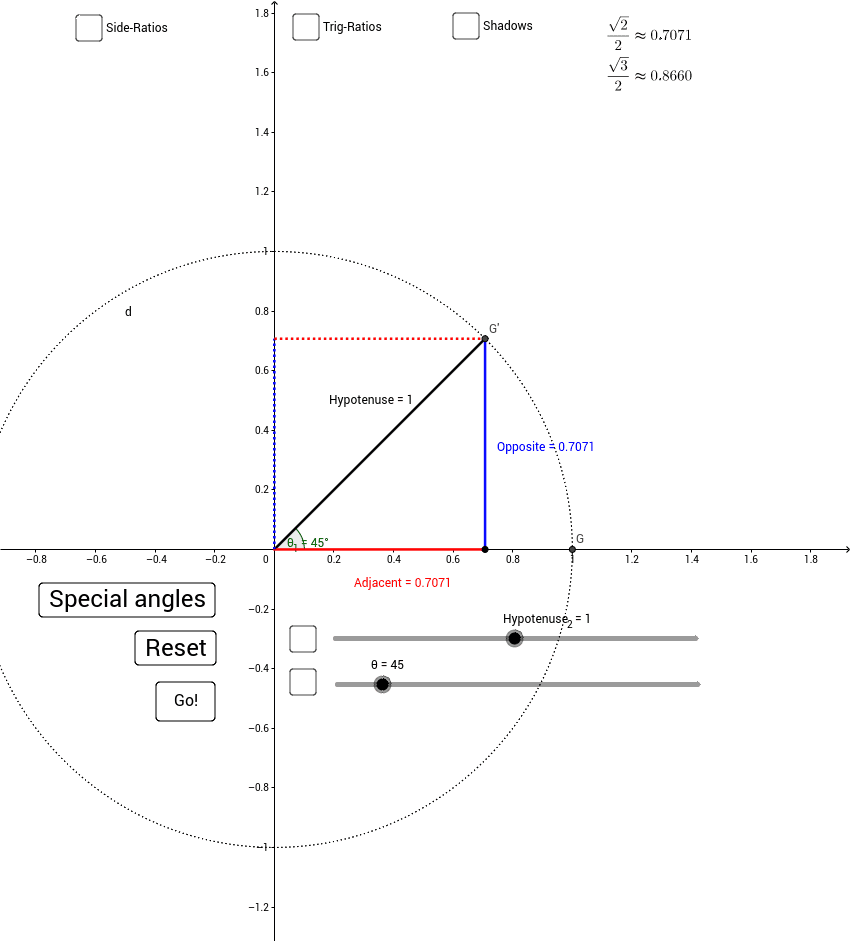
This example dynamically constructs right triangles on the unit circle to demonstrate the SOHCAHTOA definitions of trigonometric functions. It involves core concepts like the unit circle, right triangle side-angle relationships, and trigonometric definitions. Constructed using commands such as Intersect, Point, Circle, Rotate, Angle, Segment, and a dynamic angle θ slider, making it suitable for high school students and teachers to visualize trigonometric function geometry and unit circle applications.
GeoGebra Commands & Parameters
Intersect(xAxis, yAxis) → APoint(xAxis) → BCircle(A, Hypotenuse_2) → dIntersect(d, xAxis, 2) → GRotate(G, θ°, A) → G'Angle(G, A, G') → θ_1Segment(A, G') → HypotenuseSegment(G', X) → OppositeSegment(A, X) → AdjacentSegment((0, 0), Y) → bSegment(Y, G') → c
AI Drawing Prompt Reference
Draw a unit circle and dynamically construct a right triangle on it to illustrate the definitions of sine, cosine, and tangent. Start by creating point A and point B on the x-axis, then draw a unit circle d centered at A. Next, rotate point G on the x-axis by θ degrees around point A to get G', and calculate the angle ∠GAG' as θ_1. Connect point A to G' to form the hypotenuse, connect G' to point X on the x-axis to form the opposite side, and connect A to X to form the adjacent side. Finally, connect the origin to point Y on the y-axis to form the height b, and connect Y to G' to form the projection c of the hypotenuse.
The prompt above was compiled from the original drawing commands and is for reference only.