
Snowflake Rotational Symmetry: Polygon Construction via Rotation
Loading the math board and drawing, please wait…
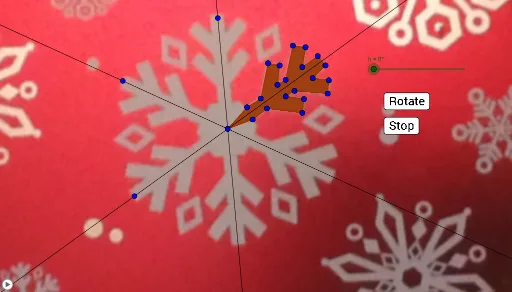
This GeoGebra example demonstrates how to build a snowflake-like figure using repeated rotational transformations, revealing clear rotational symmetry. The key mathematical ideas include rotational symmetry about a center point, constructing composite polygonal patterns, and using geometric transformations to replicate structure. Construction details are drawn from the provided commands: Polygon creates the base polygon (e.g., poly1), Line establishes defining edges/structure segments, and Rotate repeatedly generates new copies of the base shape by rotating around a specified pivot. The figure is assembled from a network of points (such as A, B and many rotated/generated points) and the resulting rotated polygonal pieces and auxiliary objects (e.g., the collections of points and line/polygon segments listed in the construction summary). Suitable for middle school through early university geometry lessons, it’s ideal for teaching and exploring symmetry, transformations, and geometric construction workflows.
GeoGebra Commands & Parameters
Polygon(C, D, M, N, O, P, Q, R, S, T, U, V, E, W, F, G, H, I, J, K, L) → poly1, c, l, m, n, o, p, q, r, s, t, u, d, v, w, e, f, g, h_1, i, j, kLine(C, Z) → aLine(C, A_1) → bLine(C, B_1) → a_1Rotate(C, h, C) → C'Rotate(D, h, C) → D'Rotate(E, h, C) → E'Rotate(F, h, C) → F'Rotate(G, h, C) → G'Rotate(H, h, C) → H'Rotate(I, h, C) → I'Rotate(J, h, C) → J'Rotate(K, h, C) → K'Rotate(L, h, C) → L'Rotate(M, h, C) → M'Rotate(N, h, C) → N'Rotate(O, h, C) → O'Rotate(P, h, C) → P'Rotate(Q, h, C) → Q'Rotate(R, h, C) → R'Rotate(S, h, C) → S'Rotate(T, h, C) → T'Rotate(U, h, C) → U'Rotate(V, h, C) → V'Rotate(W, h, C) → W'Polygon(C', D', M', N', O', P', Q', R', S', T', U', V', E', W', F', G', H', I', J', K', L') → poly1', c', l', m', n', o', p', q', r', s', t', u', d', v', w', e', f', g', h', i', j', k'Rotate(pic1, h, C) → pic1'Rotate(C', h, C) → C''Rotate(D', h, C) → D''Rotate(E', h, C) → E''Rotate(F', h, C) → F''Rotate(G', h, C) → G''Rotate(H', h, C) → H''Rotate(I', h, C) → I''Rotate(J', h, C) → J''Rotate(K', h, C) → K''Rotate(L', h, C) → L''Rotate(M', h, C) → M''Rotate(N', h, C) → N''Rotate(O', h, C) → O''Rotate(P', h, C) → P''Rotate(Q', h, C) → Q''Rotate(R', h, C) → R''Rotate(S', h, C) → S''Rotate(T', h, C) → T''Rotate(U', h, C) → U''Rotate(V', h, C) → V''Rotate(W', h, C) → W''Polygon(C'', D'', M'', N'', O'', P'', Q'', R'', S'', T'', U'', V'', E'', W'', F'', G'', H'', I'', J'', K'', L'') → poly1'', c'', l'', m'', n'', o'', p'', q'', r'', s'', t'', u'', d'', v'', w'', e'', f'', g'', h'', i'', j'', k''Rotate(C'', h, C) → C'''Rotate(D'', h, C) → D'''Rotate(E'', h, C) → E'''Rotate(F'', h, C) → F'''Rotate(G'', h, C) → G'''Rotate(H'', h, C) → H'''Rotate(I'', h, C) → I'''Rotate(J'', h, C) → J'''Rotate(K'', h, C) → K'''Rotate(L'', h, C) → L'''Rotate(M'', h, C) → M'''Rotate(N'', h, C) → N'''Rotate(O'', h, C) → O'''Rotate(P'', h, C) → P'''Rotate(Q'', h, C) → Q'''Rotate(R'', h, C) → R'''Rotate(S'', h, C) → S'''Rotate(T'', h, C) → T'''Rotate(U'', h, C) → U'''Rotate(V'', h, C) → V'''Rotate(W'', h, C) → W'''Polygon(C''', D''', M''', N''', O''', P''', Q''', R''', S''', T''', U''', V''', E''', W''', F''', G''', H''', I''', J''', K''', L''') → poly1''', c''', l''', m''', n''', o''', p''', q''', r''', s''', t''', u''', d''', v''', w''', e''', f''', g''', h''', i''', j''', k'''Rotate(C''', h, C) → C_1Rotate(D''', h, C) → D_1Rotate(E''', h, C) → E_1Rotate(F''', h, C) → F_1Rotate(G''', h, C) → G_1Rotate(H''', h, C) → H_1Rotate(I''', h, C) → I_1Rotate(J''', h, C) → J_1Rotate(K''', h, C) → K_1Rotate(L''', h, C) → L_1Rotate(M''', h, C) → M_1Rotate(N''', h, C) → N_1Rotate(O''', h, C) → O_1Rotate(P''', h, C) → P_1Rotate(Q''', h, C) → Q_1Rotate(R''', h, C) → R_1Rotate(S''', h, C) → S_1Rotate(T''', h, C) → T_1Rotate(U''', h, C) → U_1Rotate(V''', h, C) → V_1Rotate(W''', h, C) → W_1Polygon(C_1, D_1, M_1, N_1, O_1, P_1, Q_1, R_1, S_1, T_1, U_1, V_1, E_1, W_1, F_1, G_1, H_1, I_1, J_1, K_1, L_1) → poly2, c_1, l_1, m_1, n_1, o_1, p_1, q_1, r_1, s_1, t_1, u_1, d_1, v_1, w_1, e_1, f_1, g_1, h_2, i_1, j_1, k_1Rotate(C_1, h, C) → Z_1Rotate(D_1, h, C) → A_2Rotate(E_1, h, C) → B_2Rotate(F_1, h, C) → C_2Rotate(G_1, h, C) → D_2Rotate(H_1, h, C) → E_2Rotate(I_1, h, C) → F_2Rotate(J_1, h, C) → G_2Rotate(K_1, h, C) → H_2Rotate(L_1, h, C) → I_2Rotate(M_1, h, C) → J_2Rotate(N_1, h, C) → K_2Rotate(O_1, h, C) → L_2Rotate(P_1, h, C) → M_2Rotate(Q_1, h, C) → N_2Rotate(R_1, h, C) → O_2Rotate(S_1, h, C) → P_2Rotate(T_1, h, C) → Q_2Rotate(U_1, h, C) → R_2Rotate(V_1, h, C) → S_2Rotate(W_1, h, C) → T_2Polygon(Z_1, A_2, J_2, K_2, L_2, M_2, N_2, O_2, P_2, Q_2, R_2, S_2, B_2, T_2, C_2, D_2, E_2, F_2, G_2, H_2, I_2) → poly2', z_1, i_2, j_2, k_2, l_2, m_2, n_2, o_2, p_2, q_2, r_2, a_2, s_2, t_2, b_2, c_2, d_2, e_2, f_2, g_2, h_3
AI Drawing Prompt Reference
Draw a snowflake-like polygon pattern with rotational symmetry about a central point C. Start by constructing a complex polygon with many vertices, and add three auxiliary lines radiating from the center as structural guides. Then rotate the entire polygon around C by a fixed angle to create a first set of rotated copies, and rotate those copies again by the same angle to produce a second set, resulting in three layers of rotationally symmetric shapes. All copies are evenly distributed around the center, clearly demonstrating rotational symmetry and geometric transformation.
The prompt above was compiled from the original drawing commands and is for reference only.