
Smallest Square Enclosing a Triangle
Loading the math board and drawing, please wait…
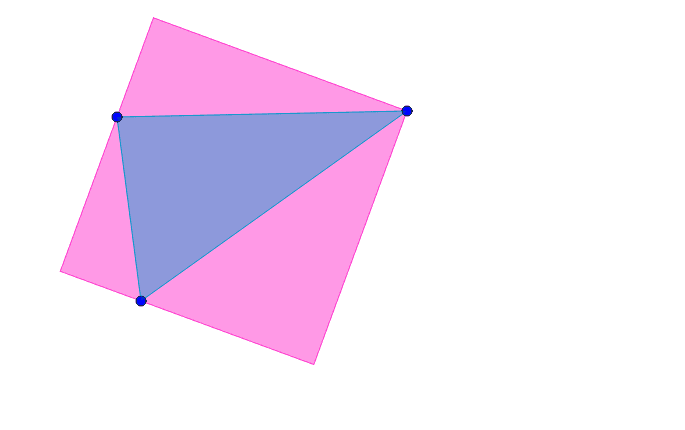
This example demonstrates how to create the smallest square using GeoGebra to enclose a given triangle. Key mathematical concepts include geometric construction, minimal bounding rectangle, and coordinate geometry. The construction involves using commands like Polygon, Circle, Midpoint to calculate triangle vertices and determine the square's dimensions. Suitable for middle or high school students learning geometric constructions and coordinate geometry applications.
GeoGebra Commands & Parameters
Polygon(A, B, C) → poly1, c, a, bSort({a, b, c}) → list1Intersect(Element[list1, 1], Element[list1, 2]) → D_1Intersect(Element[list1, 2], Element[list1, 3]) → E_1Intersect(Element[list1, 3], Element[list1, 1]) → F_1Midpoint(F_1, E_1) → GCircle(G, E_1) → d_1LineBisector(E_1, F_1) → e_2Intersect(d_1, e_2) → H, IPolygon(F_1, I, E_1, H) → poly2, f_1, i, e_1, hIf(IsInRegion[D_1, poly2], H, D_1) → JSegment(E_1, F_1) → g_1Circle(J, g_1) → kOrthogonalLine(J, g_1) → jIntersect(j, g_1) → KRay(J, K) → lIntersect(k, l) → L,Line(E_1, L) → mIntersect(d_1, m, 2) → DLine(F_1, D) → nOrthogonalLine(E_1, m) → pOrthogonalLine(J, n) → qIntersect(n, q) → EIntersect(p, q) → FPolygon(E_1, D, E, F) → poly3, d, e, f, g
AI Drawing Prompt Reference
Draw a triangle and then find the smallest square that can completely enclose it. First, determine the midpoints of the triangle's three sides, then use these midpoints and the triangle's vertices to construct auxiliary circles and lines. Next, locate the four vertices of the square, ensuring it fully covers the triangle, and finally connect these four vertices to form the square.
The prompt above was compiled from the original drawing commands and is for reference only.