
Slope-Intercept Form Practice
Loading the math board and drawing, please wait…
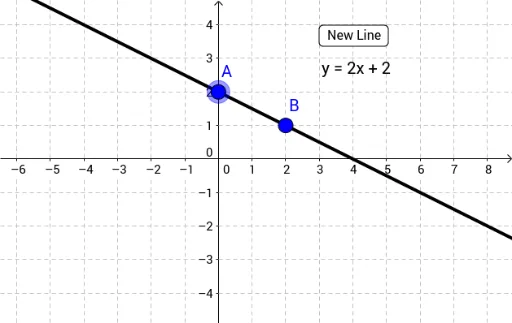
This interactive GeoGebra example demonstrates the slope-intercept form of a linear equation (y = mx + b) through hands-on practice. Users can adjust the slope m and y-intercept b to see how the line changes on the coordinate plane. Core mathematical concepts include linear functions, slope, intercept, and the geometric representation of lines. The construction uses the Line command to draw the line, along with button1, text1, text2, and points A and B to create an interactive interface for parameter adjustment. It is suitable for middle school to high school students learning linear equations and coordinate geometry, and can be used for classroom demonstrations or self-study to visualize the effects of slope and intercept on a line's position and steepness.
GeoGebra Commands & Parameters
Line(A, B) → b
AI Drawing Prompt Reference
Draw a line using the slope-intercept form y = mx + b. Adjust the slope m and y-intercept b with sliders to see how the line changes. First, draw the coordinate axes, then dynamically generate the line based on the slider values.
The prompt above was compiled from the original drawing commands and is for reference only.