
Slope-Intercept Form Identification
Loading the math board and drawing, please wait…
In collections
Math Models
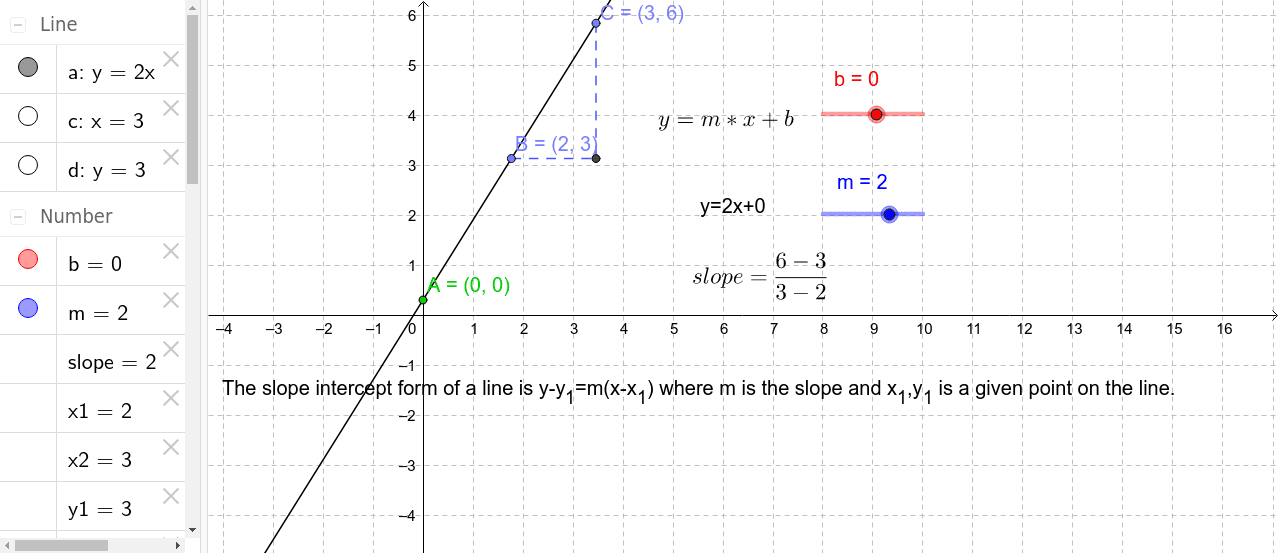
This example demonstrates how to identify the slope and y-intercept of a line using GeoGebra. Key math concepts include slope-intercept form, coordinate geometry, and linear functions. Construction highlights involve commands like Intersect, Point, OrthogonalLine, and Segment to create lines, points, and text objects. Suitable for middle school and above students learning coordinate geometry and function graphs.
GeoGebra Commands & Parameters
Intersect(a, yAxis) → APoint(a) → BPoint(a) → COrthogonalLine(C, xAxis) → cOrthogonalLine(B, yAxis) → dIntersect(c, d) → DSegment(B, D) → eSegment(C, D) → f
AI Drawing Prompt Reference
Draw a straight line that intersects the vertical axis at one point, and pick two distinct points on this line. From one of these points, draw a line perpendicular to the horizontal axis, and from the other point, draw a line perpendicular to the vertical axis. These two perpendicular lines meet at a point. Connect the first chosen point to this intersection with a segment, and connect the second chosen point to the same intersection with another segment. The final figure shows the line, its intersection with the vertical axis, two points on the line, two perpendicular lines, and a right triangle formed by these points, useful for analyzing the slope and y-intercept.
The prompt above was compiled from the original drawing commands and is for reference only.