
Sliceform of a Monkey Saddle
Loading the math board and drawing, please wait…
In collections
Sliceforms
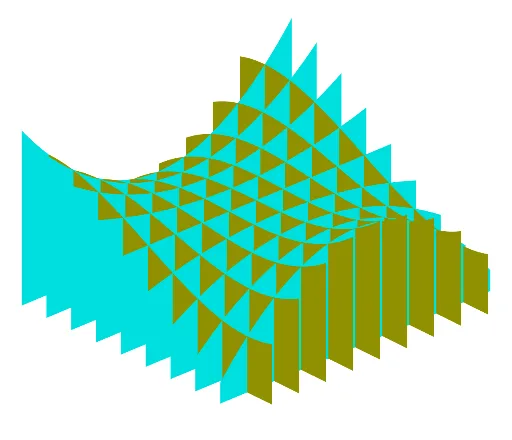
This example demonstrates how to construct a sliceform model of a monkey saddle using a series of intersecting planar slices, revealing the intricate geometry of this special surface. The monkey saddle is a classic multi-saddle surface, typically defined by z = x³ - 3xy², featuring three descending and three ascending directions at the origin, unlike the ordinary saddle which has two. The construction uses GeoGebra's Sequence command to generate a set of parallel or rotated slicing planes, with objects a, L1, l4, and l5 controlling the spacing, orientation, and number of slices, resulting in an interactive 3D slice structure. This example is suitable for high school to university-level mathematics, aiding in the understanding of multivariable function surfaces, the slicing method (cross-section method), and 3D visualization, and can also serve as an extension topic for fractal geometry or similarity transformations.
GeoGebra Commands & Parameters
Sequence(Surface[t, w, (u * a(t, w)), t, -5, 5, u, 0, 1], w, -4, 4) → l4Sequence(Surface[w, t, (u * a(w, t)), t, -5, 5, u, 0, 1], w, -4, 4) → l5
AI Drawing Prompt Reference
Create a sliceform model of a monkey saddle surface defined by z = x³ - 3xy². The surface has three descending and three ascending directions at the origin. Construct a series of intersecting planar slices: one set of slices parallel to the xz-plane, another set parallel to the yz-plane, each set containing about 9 evenly spaced slices. Each slice shows the cross-section curve of the surface. Together they form a 3D lattice revealing the surface's intricate geometry. The slices are perpendicular to each other, creating a grid-like structure that can be rotated for full viewing.
The prompt above was compiled from the original drawing commands and is for reference only.