
Six Pyramids in a Cube
Loading the math board and drawing, please wait…
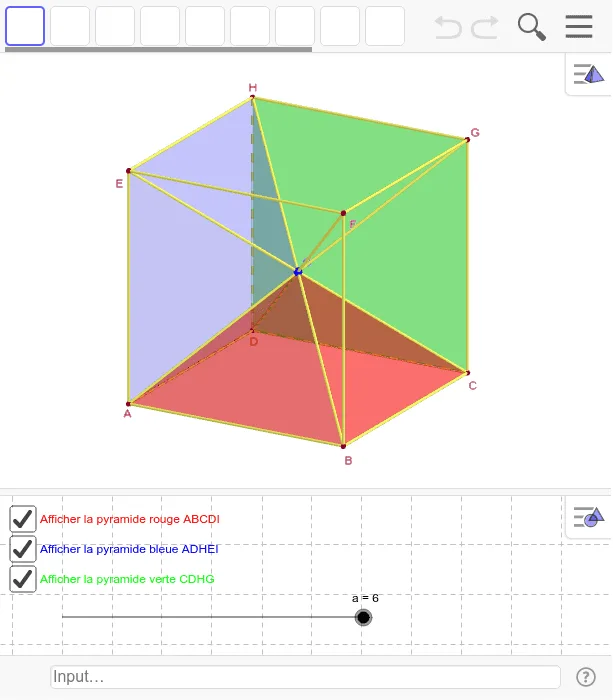
This example demonstrates the partition of six regular square-based pyramids with their apex at the center of a cube. It involves core mathematical concepts such as solid geometry, polygons, and geometric construction. The construction uses commands like Segment, Intersect, Polygon, and Pyramid in GeoGebra. Suitable for high school geometry teaching or construction practice.
GeoGebra Commands & Parameters
Segment(A, B) → ABSegment(B, C) → BCSegment(C, D) → CDSegment(D, A) → DASegment(A, E) → AESegment(B, F) → BFSegment(C, G) → CGSegment(D, H) → DHSegment(E, F) → EFSegment(F, G) → FGSegment(G, H) → GHSegment(H, E) → EHSegment(D, F) → DFSegment(B, H) → BHSegment(C, E) → CESegment(A, G) → AGIntersect(BH, CE) → IPolygon(A, B, C, D) → ABCD, a_1, b, c, dPolygon(A, D, H, E) → ADHE, a_2, d_1, h, ePolygon(C, D, H, G) → CDHG, c_1, d_2, h_1, gPyramid(ABCD, I) → ABCDI, faceABI, faceBCI, faceCDI, faceADI_1, arêteAI_1, arêteBI, arêteCI, arêteDI_1Pyramid(ADHE, I) → ADHEI, faceADI, faceDHI, faceEHI, faceAEI, arêteAI, arêteDI, arêteHI, arêteEIIntersect(DF, AG) → JPyramid(CDHG, J) → CDHGI, faceCDJ, faceDHJ, faceGHJ, faceCGJ, arêteCJ, arêteDJ, arêteHJ, arêteGJ
AI Drawing Prompt Reference
Draw six square-based pyramids inside a cube. The apex of each pyramid is at the center of the cube. First, draw the six faces of the cube. Then, find the center point. Next, connect the center point to the center of each face to form the bases of the pyramids. Finally, connect these pyramids to create a symmetric three-dimensional shape.
The prompt above was compiled from the original drawing commands and is for reference only.