
Single-Player Factor Game: Constructing Geometry from Divisors
Loading the math board and drawing, please wait…
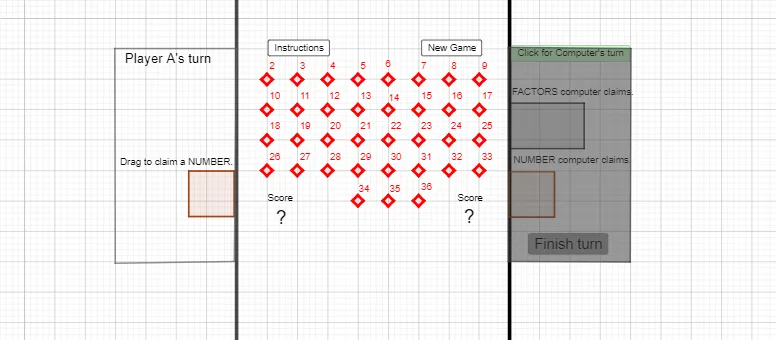
This GeoGebra example demonstrates a single-player “factor game” generation process: it randomly selects elements from integer divisor sets, then maps those selections into planar geometric objects (polygons, lines, and points), producing a structured visual outcome that can be explored repeatedly. The core math ideas are integer factorization (divisor lists, factor-related filtering, deduplication), set and list operations (removing invalid/undefined values, flattening and unique selection), random experiments (shuffling), and geometric construction in 2D (using intersections and lines to shape the configuration). Construction follows the provided GeoGebra command set: Polygon to build polygonal regions; DivisorsList and Factors to generate and compute divisor/factor candidates; If to apply conditional filtering; Remove and RemoveUndefined to discard invalid items; Sum to aggregate factor-derived parameters; Flatten and Unique to normalize and deduplicate lists; Join and Shuffle to combine and randomize candidate sets; Intersect to compute intersection points; Line to draw guiding/partition lines; and Point to place key vertices/markers. It is designed for learners from late secondary school to early university, especially suitable for lessons connecting number theory (divisors) with geometric visualization and interactive construction.
GeoGebra Commands & Parameters
Polygon(A, B, 4) → poly1, f, g, h, i, C, DDivisorsList(N) → NDFactors(N) →Remove(ND, {1, N}) → ND1If(IsInRegion[P26, poly1], 26, 0) → m26If(x(P26) < -5 ∧ y(P26) > 0, 26) → M26If(IsInRegion[P28, poly1], 28, 0) → m28If(x(P28) < -5 ∧ y(P28) > 0, 28) → M28If(IsInRegion[P29, poly1], 29, 0) → m29If(x(P29) < -5 ∧ y(P29) > 0, 29) → M29If(IsInRegion[P30, poly1], 30, 0) → m30If(x(P30) < -5 ∧ y(P30) > 0, 30) → M30If(IsInRegion[P31, poly1], 31, 0) → m31If(x(P31) < -5 ∧ y(P31) > 0, 31) → M31If(IsInRegion[P8, poly1], 8, 0) → m8If(x(P8) < -5 ∧ y(P8) > 0, 8) → M8If(IsInRegion[P32, poly1], 32, 0) → m32If(x(P32) < -5 ∧ y(P32) > 0, 32) → M32If(IsInRegion[P33, poly1], 33, 0) → m33If(x(P33) < -5 ∧ y(P33) > 0, 33) → M33If(IsInRegion[P9, poly1], 9, 0) → m9If(x(P9) < -5 ∧ y(P9) > 0, 9) → M9If(IsInRegion[P10, poly1], 10, 0) → m10If(x(P10) < -5 ∧ y(P10) > 0, 10) → M10If(IsInRegion[P34, poly1], 34, 0) → m34If(x(P34) < -5 ∧ y(P34) > 0, 34) → M34If(IsInRegion[P11, poly1], 11, 0) → m11If(x(P11) < -5 ∧ y(P11) > 0, 11) → M11If(IsInRegion[P35, poly1], 35, 0) → m35If(x(P35) < -5 ∧ y(P35) > 0, 35) → M35If(IsInRegion[P12, poly1], 12, 0) → m12If(x(P12) < -5 ∧ y(P12) > 0, 12) → M12If(IsInRegion[P36, poly1], 36, 0) → m36If(x(P36) < -5 ∧ y(P36) > 0, 36) → M36If(IsInRegion[P13, poly1], 13, 0) → m13If(x(P13) < -5 ∧ y(P13) > 0, 13) → M13If(IsInRegion[P14, poly1], 14, 0) → m14If(x(P14) < -5 ∧ y(P14) > 0, 14) → M14If(IsInRegion[P15, poly1], 15, 0) → m15If(x(P15) < -5 ∧ y(P15) > 0, 15) → M15If(IsInRegion[P16, poly1], 16, 0) → m16If(x(P16) < -5 ∧ y(P16) > 0, 16) → M16If(IsInRegion[P17, poly1], 17, 0) → m17If(x(P17) < -5 ∧ y(P17) > 0, 17) → M17If(IsInRegion[P19, poly1], 19, 0) → m19If(x(P19) < -5 ∧ y(P19) > 0, 19) → M19If(IsInRegion[P20, poly1], 20, 0) → m20If(x(P20) < -5 ∧ y(P20) > 0, 20) → M20If(IsInRegion[P21, poly1], 21, 0) → m21If(x(P21) < -5 ∧ y(P21) > 0, 21) → M21If(IsInRegion[P22, poly1], 22, 0) → m22If(x(P22) < -5 ∧ y(P22) > 0, 22) → M22If(IsInRegion[P23, poly1], 23, 0) → m23If(x(P23) < -5 ∧ y(P23) > 0, 23) → M23If(IsInRegion[P24, poly1], 24, 0) → m24If(x(P24) < -5 ∧ y(P24) > 0, 24) → M24If(IsInRegion[P25, poly1], 25, 0) → m25If(x(P25) < -5 ∧ y(P25) > 0, 25) → M25If(IsInRegion[P18, poly1], 18, 0) → m18If(x(P18) < -5 ∧ y(P18) > 0, 18) → M18If(IsInRegion[P27, poly1], 27, 0) → m27If(x(P27) < -5 ∧ y(P27) > 0, 27) → M27If(IsInRegion[P5, poly1], 5, 0) → m5If(x(P5) < -5 ∧ y(P5) > 0, 5) → M5If(IsInRegion[P4, poly1], 4, 0) → m4If(x(P4) < -5 ∧ y(P4) > 0, 4) → M4If(IsInRegion[P2, poly1], 2, 0) → m2If(x(P2) < -5 ∧ y(P2) > 0, 2) → M2If(IsInRegion[P7, poly1], 7, 0) → m7If(x(P7) < -5 ∧ y(P7) > 0, 7) → M7If(IsInRegion[P6, poly1], 6, 0) → m6If(x(P6) < -5 ∧ y(P6) > 0, 6) → M6If(IsInRegion[P3, poly1], 3, 0) → m3Sum(Lm) → mDivisorsList(m) → MDFactors(m) →Remove(MD, {1, m}) → MD1If(x(P3) < -5 ∧ y(P3) > 0, 3) → M3RemoveUndefined(MF) → MF1Remove(MF1, ND1) → MistakeFlatten(Mtotal) → M1totalUnique(M1total) → M2totalFlatten(NXtotal) → NX1totalUnique(NX1total) → NX2totalJoin({M2total, NX2total}) → Join1Shuffle(List2) → List2A, {24, 20, 11, 32, 15, 30, 17, 14, 13, 28}Join({List1, List2A, List3}) → List4Remove(List4, Join1) → LL2Remove(ND1, Join1) → ND3Remove(MD1, Join1) → MD3Polygon(P, Q, R, S) → q1, p_1, q_1, r_1, s_1Polygon(G, H, 4) → poly2, j, k, l, t, T, USum(M2total) → ScoreMUnique(NT) → NT1Sum(NX2total) → ScoreNIntersect(r_1, s_1) → C_1Remove(ND1, MF1) → missingRemove(ND3, MF1) → MissingSum(Mistake) → MistakeNRemove(MF1, Mistake) → MF2Line(M, O) → pPoint(p) → A_1Polygon(Z, A_1, G_1, I_1) → q2, z_1, a_1, g_1, i_1Point(p) → M_1Polygon(L_1, M_1, N_1, O_1) → q3, l_1, m_1, n_1, o_1Polygon(P_1, Q_1, R_1, S_1) → q4, q, r, s, f_1
AI Drawing Prompt Reference
Create a polygonal region generated by random integer factors from 1 to 40. Start by randomly selecting these factors, then construct polygons, lines, and points based on these factors. Next, filter out factors that meet specific conditions, such as x-coordinate less than -5 and y-coordinate greater than 0, and mark them as special points. Finally, generate a graphic that includes the polygons, lines, and special points based on their relationships.
The prompt above was compiled from the original drawing commands and is for reference only.