
Single Effect Stamping Press Mechanism
Loading the math board and drawing, please wait…
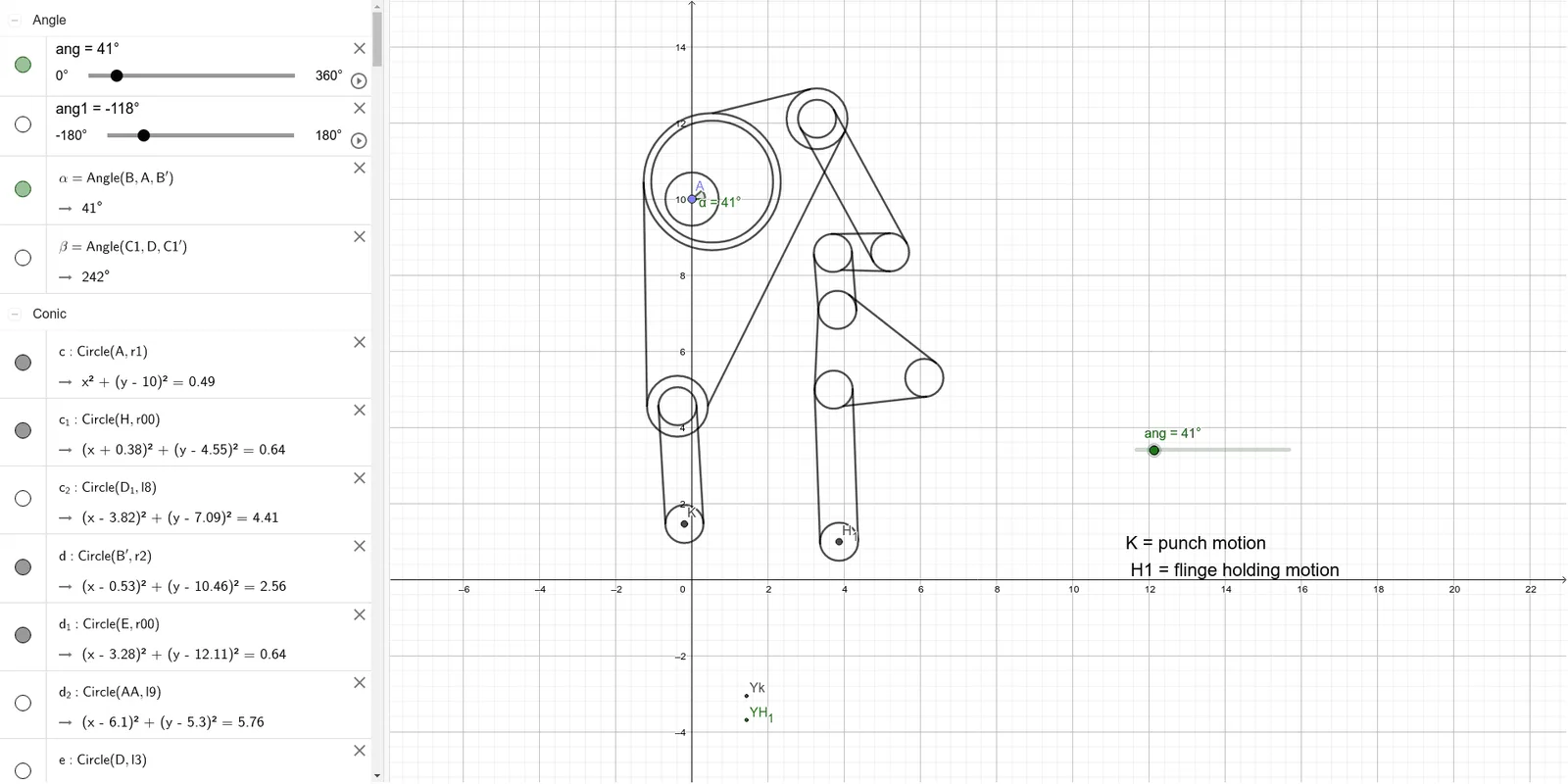
This example illustrates the working principle of a single effect stamping press. Key mathematical concepts include circles, rotation, intersection, lines, angles, and segments. The construction uses GeoGebra commands such as Circle, Rotate, Intersect, and Line. Suitable for high school mathematics education, particularly in coordinate geometry and geometric construction.
GeoGebra Commands & Parameters
Circle(A, r1) → cPoint(c) → BRotate(B, ang, A) → B'Circle(B', r2) → dPoint(d) → CCircle(D, l3) → eCircle(C, l4) → fIntersect(f, e) → E, F, ,Line(E, D) → n_1Circle(D, r3) → p_1Intersect(p_1, n_1) → B_1, C1Rotate(C1, ang1, D) → C1'Point(p_1) → B2Angle(B, A, B') → αSegment(D, E) → gPoint(d) → GCircle(G, l5) → hPoint(h) → HCircle(H, l6) → kIntersect(k, ax) → J, KSegment(H, K) → iCircle(K, r0) → pCircle(H, r0) → qCircle(E, r0) → rCircle(D, r0) → sPoint(q) → LPoint(p) → MSegment(L, M) → jPoint(q) → NPoint(p) → OSegment(N, O) → lOrthogonalLine(E, g) → mOrthogonalLine(D, g) → nIntersect(r, m) → P, QIntersect(s, n) → R, SSegment(P, R) → tSegment(Q, S) → aCircle(H, r00) → c_1Circle(E, r00) → d_1Circle(B', r000) → e_1Point(c_1) → TTangent(T, e_1) → b, f_1Intersect(e_1, f_1) → USegment(U, T) → g_1Point(c_1) → VTangent(V, d_1) → h_1, i_1Intersect(d_1, h_1) → WSegment(W, V) → j_1Point(e_1) → ZTangent(Z, d_1) → k_1, l_1Intersect(d_1, l_1) → A_1Segment(Z, A_1) → m_1Circle(AA, r4) → s_1Circle(C1', r3) → r_1Intersect(r_1, s_1) → D_1, E_1, ,Circle(D_1, l8) → c_2Circle(AA, l9) → d_2Intersect(d_2, c_2) → F1, G_1, ,Segment(AA, F1) → a_1Line(E, B2) → g_2Segment(D_1, AA) → b_1Segment(F1, D_1) → f_2Angle(C1, D, C1') → βSegment(D, C1') → q_1Segment(C1', D_1) → t_1Circle(F1, l11) → e_2Point(xAxis) → C_1Line(C_1, F_1) → h_2Intersect(e_2, h_2) → H_1, I_1Segment(F1, H_1) → i_2Circle(F1, r0) → k_2Circle(AA, r0) → p_2Circle(D_1, r0) → q_2Circle(H_1, r0) → r_2Circle(C1', r0) → s_2Point(r_2) → J_1Tangent(J_1, k_2) → j_2, l_2Intersect(k_2, l_2) → K_1Segment(K_1, J_1) → m_2Tangent(K_1, q_2) → n_2, t_2Intersect(q_2, t_2) → L_1Segment(L_1, K_1) → a_2Point(k_2) → M_1Tangent(M_1, p_2) → b_2, f_3Intersect(p_2, b_2) → N_1Segment(M_1, N_1) → g_3Point(p_2) → O_1Tangent(O_1, q_2) → h_3, i_3Intersect(q_2, h_3) → P_1Segment(P_1, O_1) → j_3Point(r_2) → Q_1Tangent(Q_1, k_2) → k_3, l_3Intersect(k_2, k_3) → R_1Segment(R_1, Q_1) → m_3Point(s_2) → S_1Tangent(S_1, s) → n_3, p_3Intersect(s, n_3) → T_1Segment(S_1, T_1) → q_3Point(s_2) → U_1Tangent(U_1, s) → r_3, s_3Intersect(s, s_3) → V_1Segment(U_1, V_1) → t_3Tangent(L_1, s_2) → a_3, b_3Intersect(s_2, b_3) → W_1Segment(W_1, L_1) → c_3Point(q_2) → Z_1Tangent(Z_1, s_2) → d_3, e_3Intersect(s_2, d_3) → A_2Segment(A_2, Z_1) → f_4
AI Drawing Prompt Reference
Draw a schematic of a single-effect stamping press mechanism. Start with a large circle centered at a fixed point, place a point on it, and rotate that point around the center by an angle to get a new point. Use this new point as the center for a second circle, and place a point on it. Then draw circles centered at two fixed points, find their intersections, and connect one intersection to a fixed point with a segment. Draw a smaller circle centered at a fixed point, intersect it with the segment, take the intersection point and rotate it. Continue constructing auxiliary circles and intersections to form the linkage. Finally, add small circles, tangents, and perpendicular lines to complete the motion diagram.
The prompt above was compiled from the original drawing commands and is for reference only.