
Sine of an Angle and Its Opposite Side
Loading the math board and drawing, please wait…
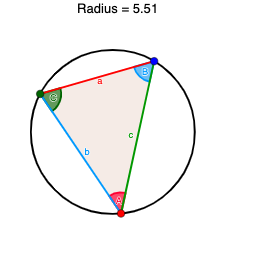
This GeoGebra example visualizes the relationship between the sine of an angle and the length of its opposite side in a triangle, demonstrating the Law of Sines. It shows that in any triangle, the ratio of each side to the sine of its opposite angle is constant and equals the diameter of the circumcircle. The construction uses commands such as Circle, Polygon, Angle, Segment, and Radius to create triangle ABC with its circumcircle, labeling angles α, β, γ and sides a, b, c, along with text objects displaying relevant values. It is suitable for high school students learning trigonometry and solving triangles, helping them grasp the geometric meaning of the Law of Sines through interactive exploration. Teachers can use it for classroom demonstrations, and students can manipulate the triangle to verify the theorem dynamically.
GeoGebra Commands & Parameters
Circle(C, B, A) → c_2Polygon(C, A, B) → poly1, b_1, a_1, c_1Angle(A, C, B) → αAngle(C, B, A) → βAngle(B, A, C) → γSegment(C, A) → bSegment(C, B) → aSegment(B, A) → cRadius(c_2) → d
AI Drawing Prompt Reference
Draw an arbitrary triangle with its circumcircle passing through all three vertices. Label the three interior angles with Greek letters and mark them with arcs inside the triangle. Show the three sides as segments, each opposite to its corresponding angle. Add text near the figure stating that the ratio of each side to the sine of its opposite angle is constant and equals the diameter of the circumcircle. The construction should clearly illustrate this relationship for interactive exploration.
The prompt above was compiled from the original drawing commands and is for reference only.