
Sine, Cosine and Tangent
Loading the math board and drawing, please wait…
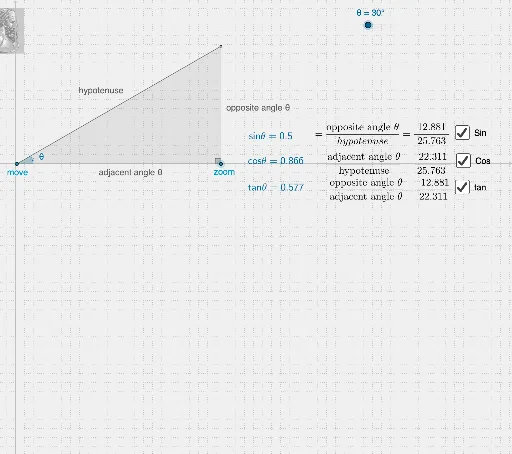
This example illustrates the basic concepts of sine, cosine, and tangent. By constructing a right triangle, it demonstrates the definitions of these trigonometric functions and their changes at different angles. GeoGebra commands such as Line, Point, Segment, Rotate, OrthogonalLine, Intersect, Angle, Midpoint, and Polygon are used. Suitable for middle school and above students to learn the basic properties and applications of trigonometric functions.
GeoGebra Commands & Parameters
Line(A, xAxis) → aPoint(a) → EPoint(a) → DSegment(E, D) → gPoint(a) → BRotate(B, θ, A) → B'Line(A, B') → cOrthogonalLine(B, xAxis) → bIntersect(b, c) → CSegment(C, A) → ρSegment(B, C) → ψAngle(B, A, B') → φSegment(A, B) → dekaAngle(C, B, A) → βMidpoint(deka) → FMidpoint(ψ) → GMidpoint(ρ) → HPolygon(A, C, B) → poly1, b_1, a_1, c_1
AI Drawing Prompt Reference
Draw a right triangle ABC with A as the right angle, B as the vertex, and C on the base. Rotate point B to get B', and draw a line through A and B'. Construct a perpendicular line from B to this line, intersecting at C. Connect AC and BC to get sides ρ and ψ. Measure angle BAC (φ) and angle ABC (β). Draw triangle ABC and mark midpoints F, G, and H of sides AC, BC, and AB respectively.
The prompt above was compiled from the original drawing commands and is for reference only.