
Sine and Cosine Relationship in a Right Triangle
Loading the math board and drawing, please wait…
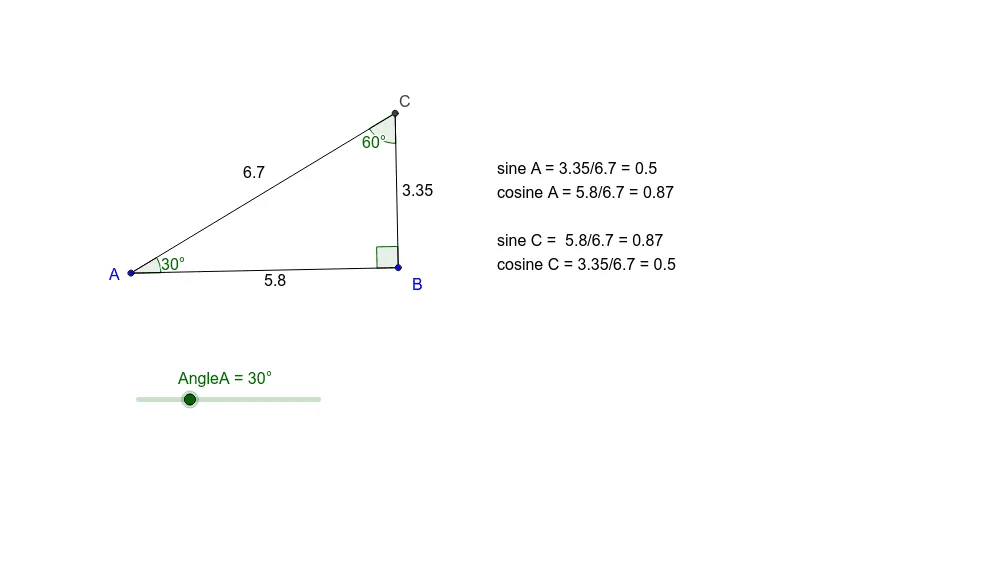
This applet demonstrates the relationship between sine and cosine in a right triangle, helping learners understand the basic concepts of trigonometry. Using rotation, angle, ray, intersection, and segment commands, it shows how sine and cosine values change with the angle. Suitable for middle school and above students learning trigonometry.
GeoGebra Commands & Parameters
Rotate(A, -90°, B) → A'Angle(A', B, A) → αRotate(B, AngleA, A) → B'Angle(B, A, B') → βRay(B, A') → aRay(A, B') → bIntersect(a, b) → CSegment(C, B) → cSegment(C, A) → dSegment(A, B) → eAngle(A, C, B) → γ
AI Drawing Prompt Reference
Draw a right triangle ABC with angle A as the right angle. Rotate point B and A to get new points B' and A', then draw rays AA' and BB' which intersect at point C. Draw line segments BC, AC, and AB, and finally measure the degrees of angles BAC, ABC, and ACB.
The prompt above was compiled from the original drawing commands and is for reference only.