
Sine and Cosine Curves from Unit Circle
Loading the math board and drawing, please wait…
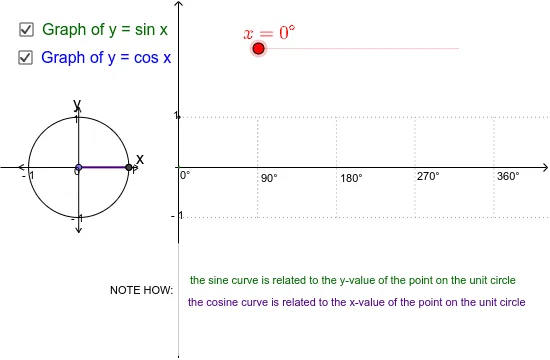
This example demonstrates sine and cosine curves using the unit circle. It involves key mathematical concepts such as trigonometry. Using GeoGebra commands like Point, Circle, Intersect, Rotate, etc., dynamic sine and cosine curves can be constructed. Suitable for high school mathematics education, particularly in coordinate geometry and trigonometry.
GeoGebra Commands & Parameters
Point(xAxis) → ACircle(A, 1) → cIntersect(c, xAxis, 2) → BRotate(B, α, A) → PAngle(B, A, P) → βSegment(A, P) → aOrthogonalLine(P, xAxis) → bIntersect(b, xAxis) → CSegment(C, P) → gRay(H, U) → qRay(I, V) → rSegment(V, U) → lSegment(X, W) → mSegment(Z, Y) → nSegment(G, F) → pSegment(J, K) → sSegment(K, O) → tSegment(K, Q) → a_1Segment(M, A_1) → b_1Segment(M, B_1) → c_1Segment(J, C_1) → d_1Segment(J, D_1) → e_1Segment(L, N) → f_1Segment(L, E) → g_1Segment(M, M') → h_1Segment(C, P) → eSegment(A, C) → fPoint(yAxis) → RPoint(yAxis) → TSegment(R, T) → h
AI Drawing Prompt Reference
Draw a unit circle and construct sine and cosine curves based on it. Start by creating point A on the x-axis, then draw a circle c with A as the center and radius 1. Circle c intersects the x-axis at two points, take the right intersection point B, rotate B around A to get point P, measure the angle ∠BAP to get angle β, draw line segment AP, then draw the perpendicular line b to AP, which intersects the x-axis at point C, and draw line segment CP. Next, draw two perpendicular lines q and r to the x-axis, and line segments l, m, n, p, s, t, a_1, b_1, c_1, d_1, e_1, f_1, g_1, h_1, and finally draw line segments h, e, and f.
The prompt above was compiled from the original drawing commands and is for reference only.