
Simplifying Fractions by Dustin Warren
Loading the math board and drawing, please wait…
In collections
CBSE Class VI Maths
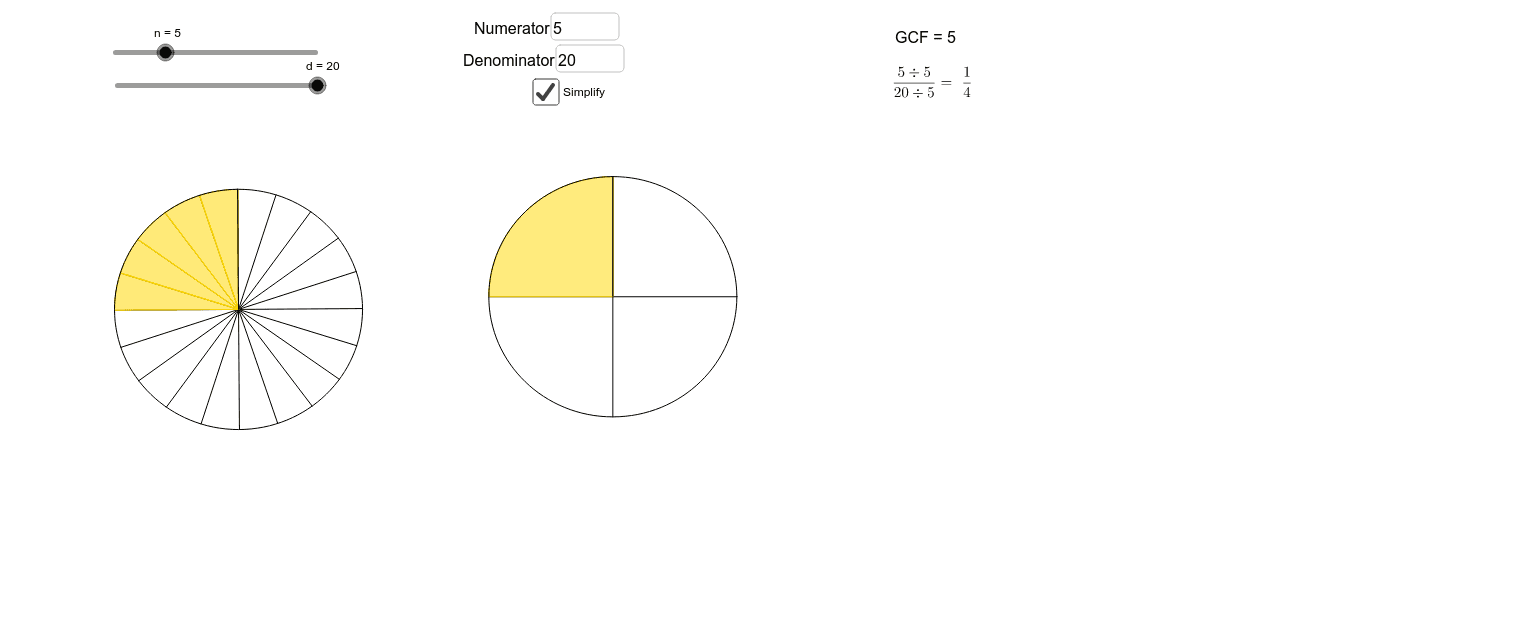
This example demonstrates how to simplify fractions. It involves basic concepts of fractions, such as the greatest common divisor of the numerator and denominator. Using GeoGebra commands like GCD, Circle, Segment, etc., it dynamically shows the process of fraction simplification. Suitable for middle school and above students to learn fraction simplification methods.
GeoGebra Commands & Parameters
GCD(n, d) → aCircle(A, B) → cSegment(A, B) → fSequence(Segment[Rotate[A, (((2 * π)) / d * z), A], Rotate[B, (((2 * π)) / d * z), A]], z, 0, d) → list1Rotate(B, ((2 * π)) / d, A) → B'CircleSector(A, B, B') → eTextfield(d) → InputBox1Textfield(n) → InputBox2Sequence(Rotate[e, (((2 * π)) / d * z), A], z, 0, n - 1) → list2Radius(c) → bCircle(C, b) → gPoint(g) → DSegment(C, D) → hSequence(Segment[Rotate[C, (((2 * π)) / (d / a) * z), C], Rotate[D, (((2 * π)) / (d / a) * z), C]], z, 0, d / a) → list3Rotate(D, ((2 * (π * a))) / d, C) → D'CircleSector(C, D, D') → kSequence(Rotate[k, (((2 * (π * a))) / d * z), C], z, 0, n / a - 1) → list4
AI Drawing Prompt Reference
Draw a dynamic diagram of fraction simplification. First, input the numerator n and the denominator d, then calculate their greatest common divisor a. Draw a circle c and a line segment f. Next, draw a circle g and select a point D from it, then draw a line segment h. Then, draw a circle c', rotate it d/a times around point C to form a series of line segments, and create an arc k. Finally, rotate arc k n/a times around point C to form a series of arcs k'.
The prompt above was compiled from the original drawing commands and is for reference only.