
Simplify Expressions with Exponents - Advanced
Loading the math board and drawing, please wait…
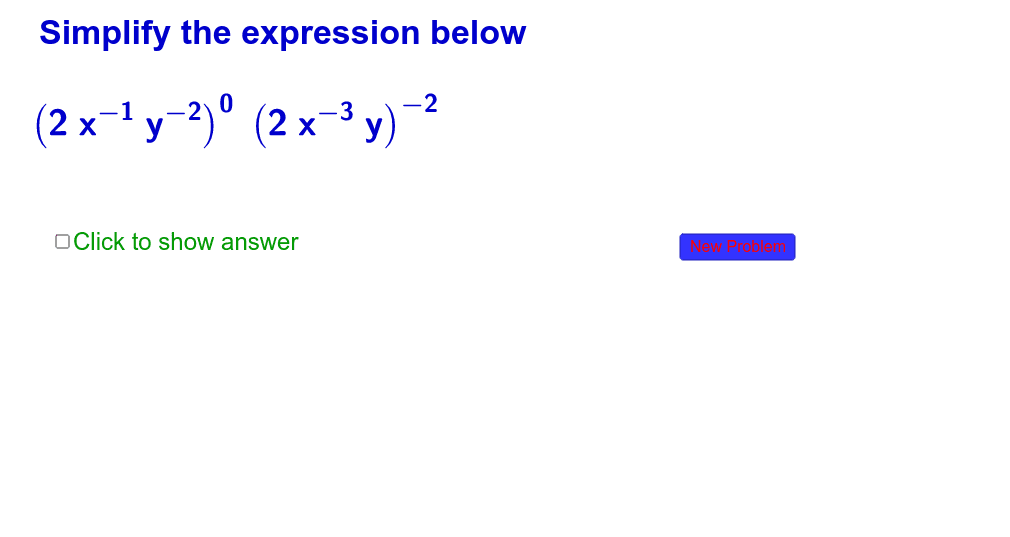
This example demonstrates how to simplify complex mathematical expressions involving exponents using GeoGebra. Core math concepts include exponent rules, coordinate representation in analytic geometry, and dynamic changes in function graphs. Key construction elements involve RandomElement for generating random elements, Simplify command for expression reduction, and LaTeX for displaying mathematical formulas. Objects like cexp, c1, c, d, e, f, a, text1, pa, pp, button1_1 are used to build an interactive interface and dynamic demonstration. Suitable for high school and above learners to understand the relationship between exponent operations and function graphs.
GeoGebra Commands & Parameters
RandomElement({-3, -2, -1, 2, 3}) → c1Simplify(e(x, y, z)) → fLaTeX(f(x, y, z)) → paLaTeX(e(x, y, z)) → pp
AI Drawing Prompt Reference
Create a dynamic visualization showing the simplification of complex mathematical expressions involving exponents, with randomly generated values, expression reduction, and LaTeX-formatted formulas displayed, integrated with coordinate geometry and dynamic function graphs to illustrate the relationship between exponent operations and function images for high school and above learners.
The prompt above was compiled from the original drawing commands and is for reference only.