
Simple Pendulum and SHM
Loading the math board and drawing, please wait…
In collections
The Domain of the Time (intuitive kinematics)
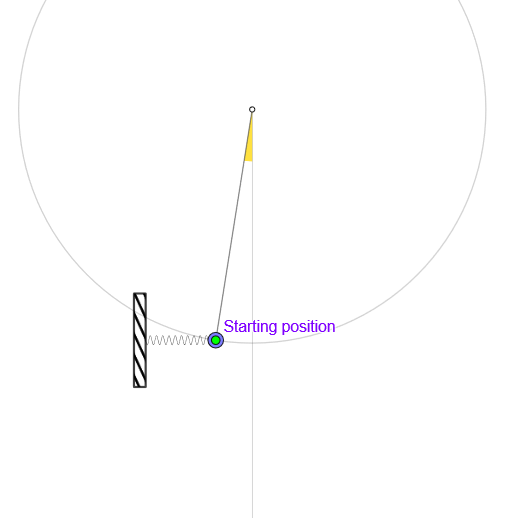
This example demonstrates the motion of a simple pendulum and its simple harmonic motion. Key mathematical concepts include trigonometry, vectors, and calculus. Using GeoGebra commands such as Circle, Arc, Point, and Segment, the motion trajectory and velocity changes of the pendulum are vividly illustrated. Suitable for high school physics and mathematics education, aiding students in understanding the mathematical model of simple harmonic motion.
GeoGebra Commands & Parameters
Circle(O, l) → cArc(c, Point[c, 0.76389], Point[c, 0.25]) → arcPoint(arc) → PPoint(c) → MSegment(O, M) → rUnitOrthogonalVector(r) → nSegment(M + g, M + gt) → sIf(Length[reg] ≟ 1, {reg(1)}, Sequence[reg(k) - reg(k + 1), k, 1, Length[reg] - 1]) → regDifmean(regDif) → TAngle(P, O, (x(O), -100)) → ampSum(Sequence[((((2 * k))! / ((2^((2 * k)) * (k!)^(2))))^(2) * (sin(amp / 2))^((2 * k))), k, 0, 83]) → sumRay(O, O + (0, -1)) → srLine(P, P + (1, 0)) → hMirror(P, sr) → P'Segment(O, P) → rPCurveCartesian(t, y(P0) + (0.1 * sin(((30 * pi) * (t - (x(MM) + 0.5)) / (x(P0) - (x(MM) + 0.5))))), t, x(P0), x(MM)) → muelle
AI Drawing Prompt Reference
Draw a circle with center O and radius l, then mark two points on the circle to define an arc; use a point on the arc as P and another point on the circle as M. Show the radius segment from O to M as r. Determine a direction orthogonal to r at that radius point and use it to create a translated segment from M along a time step. Compute an angle at O using P and a downward vertical reference to set the oscillation amplitude, then construct an oscillating spring-like curve over the x-range from x(P0) to x(MM), with its shape driven by that amplitude and trigonometric series behavior. Draw a downward ray from O, mirror P across it to get P′, and include the segment from O to P as the reference radius rP.
The prompt above was compiled from the original drawing commands and is for reference only.