
Similar Triangles (Part 1): Dynamic Proportionality and Corresponding Angles
Loading the math board and drawing, please wait…
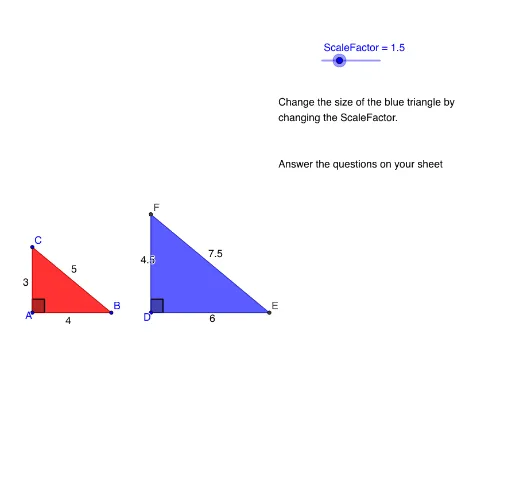
① This example demonstrates the properties of similar triangles through two dynamically scaled triangles, showing that corresponding angles are equal and corresponding sides are proportional. ② Core mathematical concepts include similarity criteria, proportional relationships, linear equations, and straight-line equations in the coordinate plane. ③ Construction highlights: using GeoGebra commands Segment, Polygon, and Angle to build two triangles, with a slider ScaleFactor controlling the scaling of the second triangle, while displaying corresponding angles α, β, γ, δ, ε, ζ and side ratios via text objects. ④ Suitable for middle school or early high school students learning similarity, and for teachers demonstrating the effect of scale factors and proportional reasoning, laying groundwork for trigonometry and coordinate geometry.
GeoGebra Commands & Parameters
Segment(B, A) → aSegment(A, C) → bSegment(C, B) → cSegment(D, E) → eSegment(D, F) → fSegment(F, E) → gPolygon(C, A, B) → poly1, b_1, c_1, a_1Polygon(F, D, E) → poly2, e_1, f_1, dAngle(A, C, B) → αAngle(B, A, C) → βAngle(C, B, A) → γAngle(D, F, E) → δAngle(F, E, D) → εAngle(E, D, F) → ζ
AI Drawing Prompt Reference
Draw two triangles, one of which is dynamically scaled by a slider, demonstrating that corresponding angles are equal and corresponding sides are proportional. Label the three interior angles of each triangle and display the relationships between corresponding angles. Use text objects to show the ratios of corresponding sides, and use a slider to control the scaling of one triangle.
The prompt above was compiled from the original drawing commands and is for reference only.