
Similar Triangles: Dynamic Construction and Properties
Loading the math board and drawing, please wait…
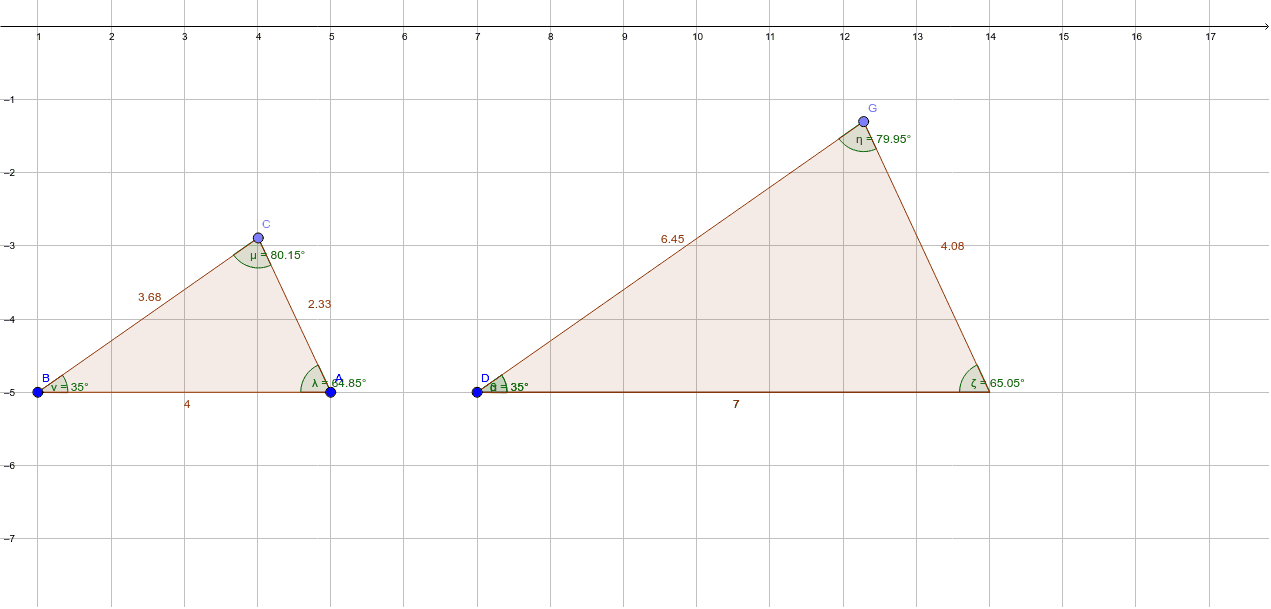
① This GeoGebra example dynamically demonstrates the construction of similar triangles, visually showing that corresponding angles are equal and corresponding sides are proportional. ② Core mathematical concepts include similarity criteria (AA, SAS, SSS), proportional relationships, incircle properties, and angle measurement, with additional elements like histogram, ellipse, variance, and logarithm for enrichment, but the main focus is on similar triangles. ③ Construction highlights: Based on the summary, commands such as Segment, Rotate, Ray, Point, Polygon, and Angle are used to create vertices A, B, C and corresponding points A', E', constructing similar shapes via rotation and rays, while incorporating an incircle and parameters λ, μ, ν to control scaling. ④ Suitable for middle school to high school students learning similarity, and for teachers to demonstrate in class, helping students intuitively grasp similarity transformations and proportional relationships, and can serve as exploratory material with sliders to adjust parameters and observe changes.
GeoGebra Commands & Parameters
Segment(A, B) → iRotate(A, 35°, B) → A'Ray(B, A') → jPoint(j) → CPolygon(A, C, B) → poly5, b_2, a_2, c_2Angle(poly5) → λ, μ, νSegment(D, E) → fRotate(E, 35°, D) → E'Angle(E, D, E') → αRay(D, E') → gPoint(g) → GPolygon(D, E, G) → poly1, g_1, d, eAngle(poly1) → β, ζ, η
AI Drawing Prompt Reference
Draw a dynamic illustration of similar triangles showing equal corresponding angles and proportional sides. Construct two similar triangles using rotation and rays, and include an incircle. Use sliders to adjust parameters and observe changes in similarity transformations and proportional relationships.
The prompt above was compiled from the original drawing commands and is for reference only.