
Similar and Non-Similar Triangles Example
Loading the math board and drawing, please wait…
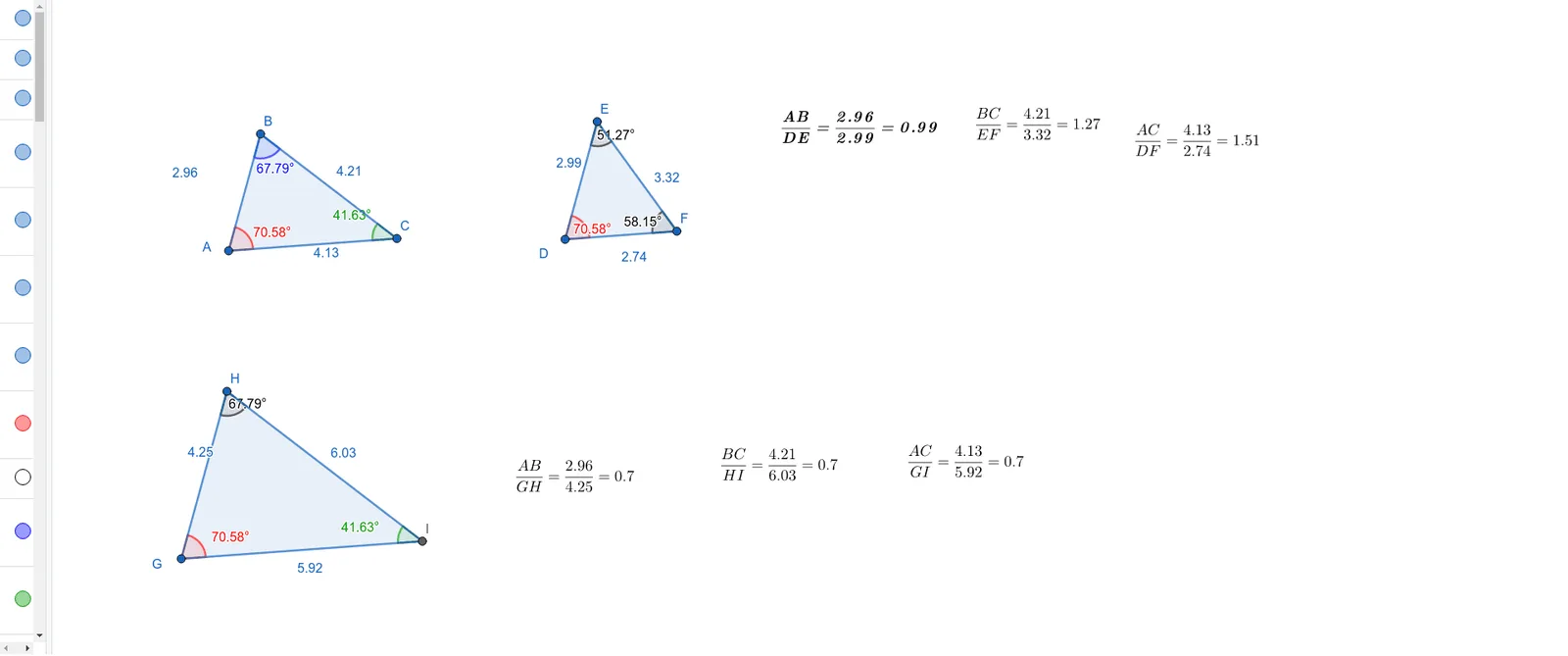
This example demonstrates the construction and comparison of similar and non-similar triangles using GeoGebra, visually illustrating the criteria for triangle similarity. Core mathematical concepts include triangle similarity theorems, angle measurement, side length ratios, and statistical probability. The construction involves GeoGebra commands/objects like Polygon, Angle, Line, Point, Ray, and Intersect as detailed in the summary. It is suitable for high school mathematics education, helping students understand geometric properties of similar triangles and their applications in probability and statistics.
GeoGebra Commands & Parameters
Polygon(B, A, C) → t1, c_1, a_1, b_1Angle(C, A, B) → aAngle(A, B, C) → bAngle(B, C, A) → cLine(D, c_1) → f_2Line(D, a_1) → g_1Point(f_2) → lPoint(g_1) → m_1Ray(D, l) → gRay(D, m_1) → hPoint(g) → EPoint(h) → FPolygon(D, E, F) → t2, f_1, d_1, e_1Angle(F, D, E) → dAngle(D, E, F) → eAngle(E, F, D) → fLine(G, c_1) → iLine(G, a_1) → jPoint(i) → mRay(G, m) → kPoint(k) → HPoint(j) → vRay(G, v) → nLine(H, b_1) → pIntersect(p, n) → IPolygon(G, H, I) → t3, i_1, g_2, h_1Angle(I, G, H) → αAngle(G, H, I) → βAngle(H, I, G) → γ
AI Drawing Prompt Reference
Draw two similar triangles and one non-similar triangle to illustrate their angle and side length relationships. Start by constructing a triangle and measuring its three angles and three side lengths. Then, construct a similar triangle by rotating and scaling one of the sides. Next, construct a non-similar triangle using another side as a reference. Finally, create a third triangle using the intersection point and measure all corresponding angles and side lengths of the triangles to compare their similarity.
The prompt above was compiled from the original drawing commands and is for reference only.