
Sequences & Series: AQA Core 2 Interactive Practice
Loading the math board and drawing, please wait…
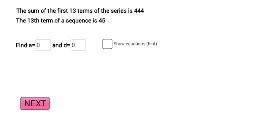
① This example demonstrates an interactive practice for arithmetic and geometric sequences and series, generating random questions and providing immediate feedback to help users understand sequence properties. ② Core mathematical concepts include the general term of arithmetic sequences, common difference, first term, number of terms, and summation formulas for series, along with applications of percentages and exponential functions. ③ Construction highlights: GeoGebra commands such as Random, Sequence, and RandomElement are used to generate random sequence terms and question parameters; Textfield and InputBox allow user input; buttons and text objects (e.g., text1, text2, cor1, cor2) display results and correctness checks, creating an adaptive exercise environment. ④ Suitable for high school students (e.g., A-Level Core 2 curriculum) learning sequences and series, and useful for classroom demonstrations or self-study to reinforce understanding of sequence formulas and calculations.
GeoGebra Commands & Parameters
Random(2, 18) → n_2Random(-5, 12) → aNSequence(aN + ((i - 1) * dN), i, 1, 20) → list1Random(2, 18) → n_1Random(1, 4) → o1RandomElement(Remove[1…4, {o1}]) → o2Textfield(userA) → InputBox1Textfield(userD) → InputBox2
AI Drawing Prompt Reference
Create an interactive practice interface for arithmetic sequences and series. Display a list of twenty terms generated with a random first term and common difference, arranged in a clear sequence. Include two input fields for the user to enter the first term and common difference. Below, add buttons and text areas to show correctness feedback. The layout should be clean and student-friendly, with the sequence and input areas prominently featured.
The prompt above was compiled from the original drawing commands and is for reference only.