
Semicircle Construction with Mirror Symmetry
Loading the math board and drawing, please wait…
In collections
Reflection - class game
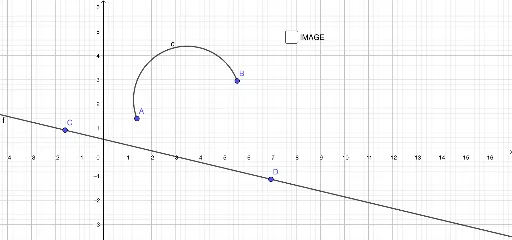
This GeoGebra example demonstrates how to construct a semicircle and perform mirror symmetry transformations. The core mathematical concepts include the definition and properties of a semicircle, point reflection about a line, and geometric characteristics of circular arcs. Construction key points: Use the Semicircle command to create a semicircle with a given segment as diameter, use the Line command to draw the axis of symmetry, and use the Mirror command to reflect the semicircle; the objects involved include endpoints A and B, arc c, line f, reflected arc c', and more. Suitable for middle to high school mathematics teaching, useful for exploring circle symmetry properties, geometric transformation concepts, or as an introductory example for locus and arc construction.
GeoGebra Commands & Parameters
Semicircle(A, B) → cLine(C, D) → fMirror(c, f) → c'
AI Drawing Prompt Reference
Draw a semicircle using a segment as its diameter, then draw a vertical line through the midpoint of the segment as the axis of symmetry. Reflect the semicircle over this axis to create a mirrored semicircle, demonstrating the geometric properties of reflection symmetry.
The prompt above was compiled from the original drawing commands and is for reference only.