
7.7.1 Angle Relationships: Constructing Angle Links with Circles and Transforms
Loading the math board and drawing, please wait…
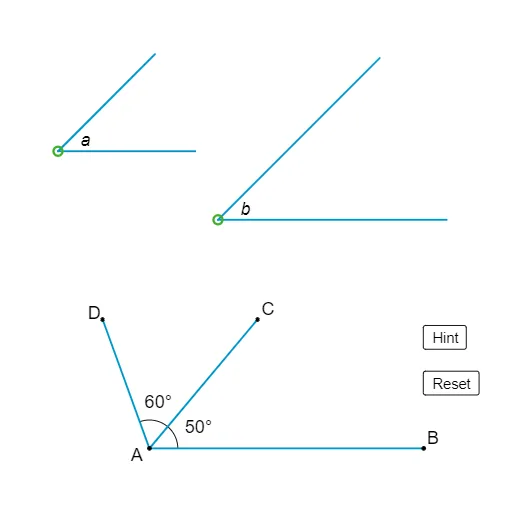
This example demonstrates how to visualize relationships between angles by using circle-based constructions together with geometric transformations. It highlights angle correspondence by showing how certain angle positions remain linked when rotated or mirrored, and how circle arcs can encode the relevant angular geometry. Key concepts include angle relationships (visualizing equal/related angles through geometry), the role of circles and circle arcs in angle formation and measurement, and the invariance of geometric constraints under transformations. Construction approach: Circle and CircleArc build the underlying circular angle framework; Ray, Line, and Segment define the angle rays and supporting segments; Rotate and Mirror generate corresponding transformed configurations; Intersect finds critical points that anchor the relationships; Point and text objects label and report the constructed angle information. The setup uses many intermediate labeled objects (e.g., points like A, B', C', D, G, H and annotation texts) and supports interactive viewing (buttons/controls) to help learners observe the angle-relationship structure dynamically. Suitable for middle and high school geometry lessons, especially when teaching and reviewing angle relationship reasoning and geometric construction skills.
GeoGebra Commands & Parameters
Circle(A, B') → cRotate(B', 50°, A) → C'Rotate(C', 60°, A) → DSegment(A, B') → fSegment(A, C') → gSegment(A, D) → hCircle(E, G) → dCircle(F, H) → eRotate(G, 45°, E) → G'Rotate(H, 45°, F) → H'Segment(G, E) → iSegment(G', E) → jSegment(H, F) → kSegment(H', F) → lRay(A, B') → mMirror(A, B') → BSegment(A, B) → nLine(D, n) → pRay(A, C') → qIntersect(p, q) → CSegment(A, C) → rPoint(n) → ICircle(A, I) → sIntersect(s, r, 1) → JIntersect(s, h, 1) → KCircleArc(A, I, J) → tCircleArc(A, J, K) → c_1
AI Drawing Prompt Reference
Draw an angle relationship diagram with two circles c and d, and their rotated points C', D, G', and H'. Define the angle sides with line segments f, g, and h, and generate corresponding angle relationships through rotation and mirroring. Use intersection point C and line segment r to define a new circle s, and find the intersections J and K of circle s with arcs t and c_1 to complete the drawing of arcs t and c_1.
The prompt above was compiled from the original drawing commands and is for reference only.