
Segment Trisection Construction with GeoGebra
Loading the math board and drawing, please wait…
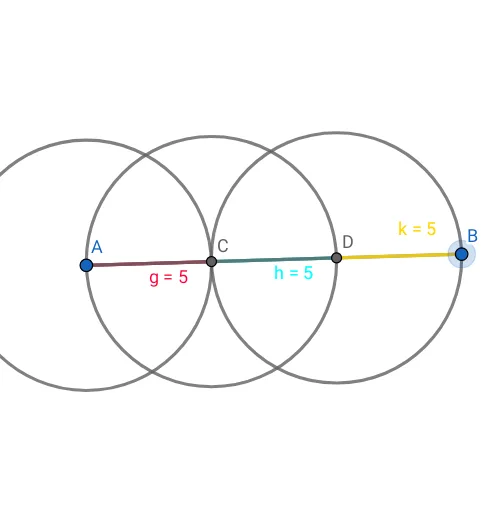
This GeoGebra example illustrates a classical geometric construction for trisecting a line segment. The activity shows how to divide a given segment AB into three equal parts using only points, circles, and intersections. Core mathematical ideas include the section formula, properties of equal partitions, and the use of circles to locate interior points. The construction steps involve defining points A and B, drawing segment AB, constructing auxiliary circles, and intersecting them to obtain points C and D that serve as trisection markers. The process highlights the power of dynamic geometry software in visualizing and verifying geometric relationships. Designed for middle‑school and high‑school students, as well as teachers introducing geometric constructions and coordinate geometry concepts, this example provides an interactive way to explore precision, symmetry, and the algebraic‑geometric connection in a hands‑on environment.
GeoGebra Commands & Parameters
Point(Circle[A, 15]) → BSegment(A, B) → fCircle(A, 5) → cIntersect(c, f, 1) → CCircle(C, 5) → dIntersect(d, f, 2) → DCircle(D, 5) → eSegment(A, C) → gSegment(C, D) → hSegment(C, A) → iSegment(D, C) → jSegment(B, D) → k
AI Drawing Prompt Reference
Draw a line segment AB. With A as the center, draw a circle with radius 5 and another with radius 15, intersecting AB at point B. With C as the center, draw a circle with radius 5, intersecting AB at point D. Connect AC, CD, and DB, and draw the three circles and two intersection points to show how to trisect the segment AB.
The prompt above was compiled from the original drawing commands and is for reference only.