
Sector to Cone Geometric Construction
Loading the math board and drawing, please wait…
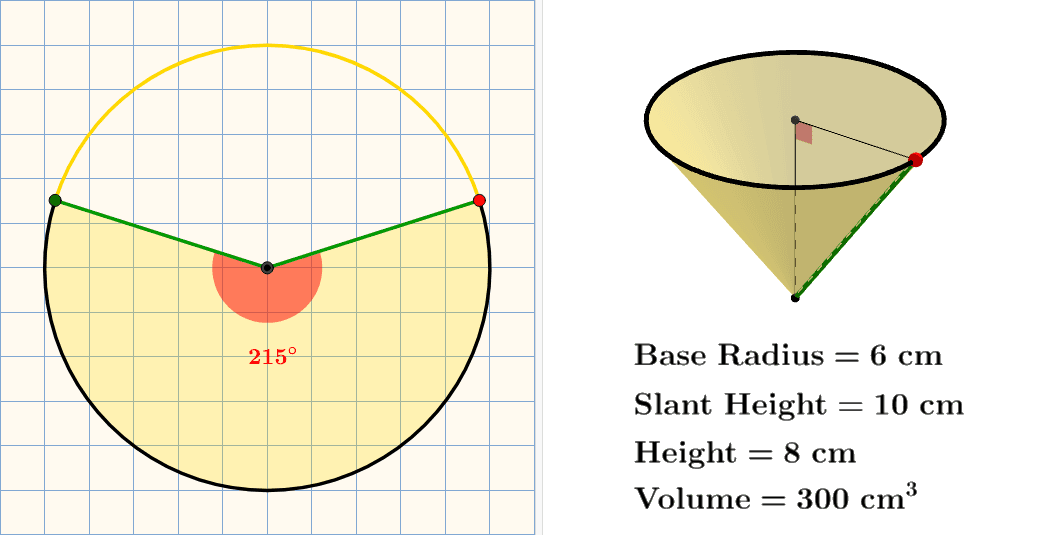
This example demonstrates the geometric construction of converting a sector into a cone. Key mathematical concepts include cones, circles, trigonometric functions, and coordinate geometry. The construction involves GeoGebra commands such as Intersect, Circle, CircleSector, and CurveCartesian, using objects like A, B, C, D, etc. It is suitable for high school students or college freshmen learning solid geometry and function transformations.
GeoGebra Commands & Parameters
Intersect(xAxis, yAxis) → APoint(xAxis) → BCircle(A, B) → cIntersect(c, yAxis, 1) → CIntersect(c, yAxis, 2) → DSemicircle(D, C) → dPoint(d) → EMirror(E, yAxis) → E'CircleSector(A, E', E) → eCircleArc(A, E, E') → fCircleArc(A, E', E) → gSegment(A, E') → hSegment(A, E) → iAngle(E', A, E) → αCurveCartesian(x(H) + (rr * cos(t)), y(H) + ((rr * sin(θ)) * sin(t)), t, 0, (2 * π)) → aPoint(a) → MMirror(M, Line[K, L]) → M'Circle(zAxis, (rr, 0, 0)) → kPoint(k) → JSphere(J, 10) → bIntersect(j, b, 2) → NCone(N, I, rr) → m, p, lSegment(I, N) → qPoint(p) → OSegment(N, O) → rAngle(O, N, I) → βSegment(O, I) → sCircle(zAxis, (0, 0, 10)) → tCircle((0, 0, 0), (10, 0, 0), space) → c_1
AI Drawing Prompt Reference
Draw a sector and rotate its edges to form a cone. Start by sketching a circle and its diameter, then draw a semicircle using the diameter as the chord. Connect the center of the circle to a point on the semicircle and mirror that point. Next, create a sector using the center and the semicircle. Draw the two radii of the sector, then form the cone's lateral surface based on the sector's central angle and radius. Mark the cone's apex and base circle. Finally, add a sphere along the cone's axis to complete the construction.
The prompt above was compiled from the original drawing commands and is for reference only.