
Sector Area Formula
Loading the math board and drawing, please wait…
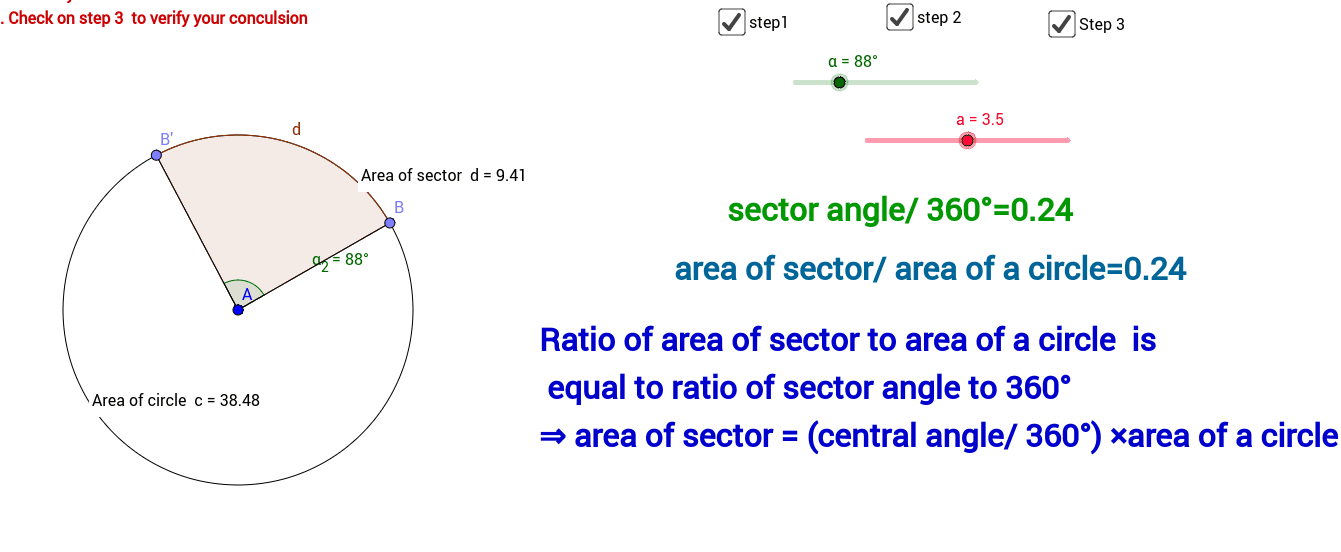
This example demonstrates the calculation of sector area. Key mathematical concepts include the sector area formula and its application. Using GeoGebra commands such as Circle, Point, Segment, Rotate, Angle, CircleSector, and Area, the construction process of the sector is visually illustrated. Suitable for middle school and above students to learn geometric construction and area calculation.
GeoGebra Commands & Parameters
Circle(A, a) → cPoint(c) → BSegment(A, B) → fRotate(B, α, A) → B'Angle(B, A, B') → α_2Segment(A, B') → gCircleSector(A, B, B') → dArea(d) → bPointIn(d) → PointdArea(c) → ePointIn(c) → Pointc
AI Drawing Prompt Reference
Draw a circle with a center point and arbitrary radius. Place a point on the circle and connect it to the center to form a radius. Rotate this radius around the center by an angle to create a second radius, so that the two radii and the arc between them form a sector. Mark the angle between the two radii and display the area of the sector. Also place a point inside the sector and another point inside the circle to help visualize the area relationship. The figure should clearly show the ratio of the sector area to the circle area.
The prompt above was compiled from the original drawing commands and is for reference only.