
Sections of Triangular Prisms by Kalissa
Loading the math board and drawing, please wait…
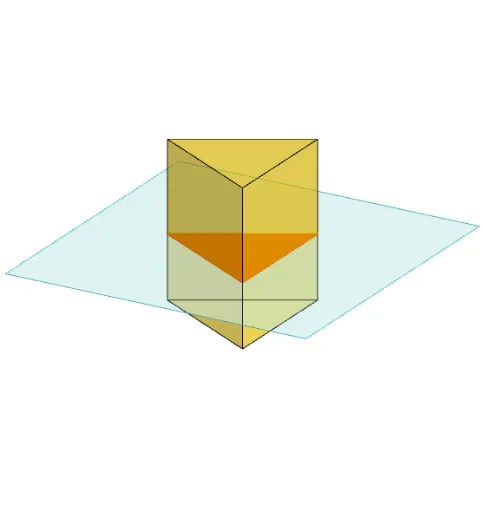
This example demonstrates the various cross-sections formed by a triangular prism. Key math concepts include prism geometry, Pythagorean theorem, line segments, intersections, derivatives, and cross-sectional area calculations. It is constructed using commands like Polygon, PointIn, Translate, Rotate, Prism, Plane, IntersectPath, and OrthogonalLine. Suitable for high school solid geometry instruction and exploratory learning.
GeoGebra Commands & Parameters
Polygon(B + (-2, -2), B + (2, -2), B + (2, 2), B + (-2, 2)) → poly3, e, f, g, iPointIn(poly3) → CTranslate((0, 0, 0), Vector[B, C]) → APolygon(A + (-4, -4), A + (4, -4), A + (4, 4), A + (-4, 4)) → poly1, a, b, c, dRotate(Rotate[Translate[poly1, Vector[A, A + (0, 0, h)]], (90° * s), A + (0, 0, h), yAxis], (90° * t), A, zAxis) → poly2Rotate(D, 120°, (0, 0, 0)) → EPolygon(D, E, 3, xOyPlane) → poly4, j, k, l, FPrism(poly4, D + (0, 0, 4)) → m, M, edge4, edge5, edge6, N, face1, face2, face3, face4, edge1, edge2, edge3PointIn(poly2) → GPointIn(poly2) → HPointIn(poly2) → IPlane(G, I, H) → nIntersectPath(n, m) → poly6, poly5, r, a_1, b_1, c_1, K, L_1, O, P, J, L, p, qRotate(m, 0, zAxis) → m'Rotate(m, 0, zAxis) → m'_1OrthogonalLine(A, n) → d_1
AI Drawing Prompt Reference
Draw a triangular prism to demonstrate various cross-sections. Start by creating a prism with a rectangular base and a triangular top. Then, connect a point randomly on the top face to the base to form a triangular cross-section. Next, rotate the rectangular base around the center of the top face to create another triangular cross-section. Finally, select random points within the rotated triangle, draw a plane through these points, and show the intersections with the prism to highlight different cross-sections, labeling key points and lines.
The prompt above was compiled from the original drawing commands and is for reference only.