
Sections of a Cuboid
Loading the math board and drawing, please wait…
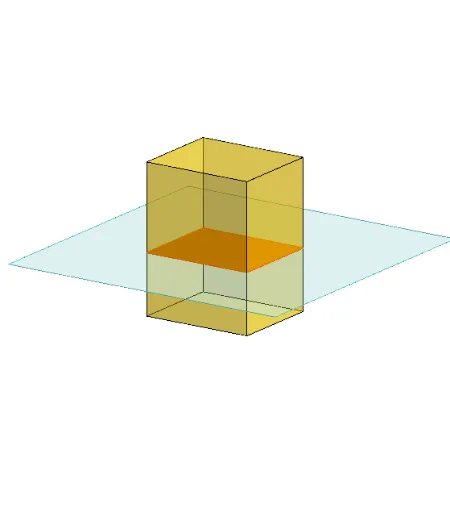
This example demonstrates the different sections of a cuboid. Key mathematical concepts include the properties of sections in solid geometry. Using GeoGebra commands such as Polygon, PointIn, Translate, Rotate, etc., the example dynamically shows the changes in sections. Suitable for middle school and above students learning solid geometry.
GeoGebra Commands & Parameters
Polygon(B + (-2, -2), B + (2, -2), B + (2, 2), B + (-2, 2)) → poly3, e, f, g, iPointIn(poly3) → CTranslate((0, 0, 0), Vector[B, C]) → APolygon(A + (-4, -4), A + (4, -4), A + (4, 4), A + (-4, 4)) → poly1, a, b, c, dRotate(Rotate[Translate[poly1, Vector[A, A + (0, 0, h)]], (90° * s), A + (0, 0, h), yAxis], (90° * t), A, zAxis) → poly2Rotate(D, 120°, (0, 0, 0)) → EPrism(Polygon[(-1.5, -1.25, 0), (1.5, -1.25, 0), (1.5, 1.25, 0), (-1.5, 1.25, 0)], (-1.5, -1.25, 4)) → m, M, edge2, edge3, edge4, edge5, edge6, edge7, edge8, N, Q, face1, face2, face3, face4, face5, edge1Polygon(D, E, 3, xOyPlane) → poly4, j, k, l, FPointIn(poly2) → GPointIn(poly2) → HPointIn(poly2) → IPlane(G, I, H) → nIntersectPath(n, m) → poly6, poly5, r, a_1, b_1, c_1, K, L_1, O, P, J, L, p, qRotate(m, 0, zAxis) → m'Rotate(m, 0, zAxis) → m'_1OrthogonalLine(A, n) → d_1