
Sections of a Cube by Dan Dale
Loading the math board and drawing, please wait…
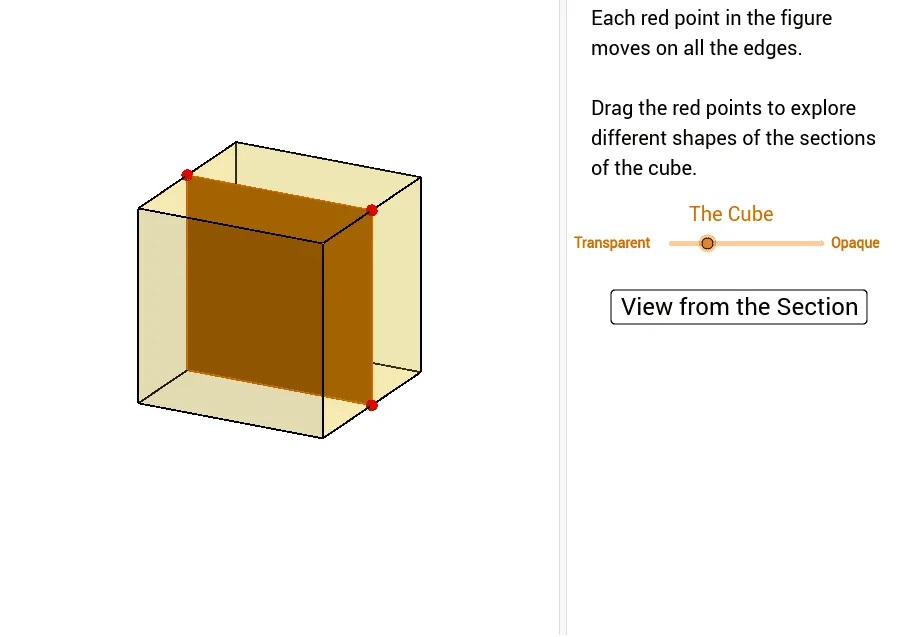
This example demonstrates different sections of a cube. It involves solid geometry and geometric construction. Using GeoGebra commands such as Cube, Polygon, PointIn, etc., it dynamically shows the changes in the sections of a cube. Suitable for middle school and above students or teachers.
GeoGebra Commands & Parameters
Cube((-1.5, -1.5, 0), (1.5, -1.5, 0), xOyPlane) → m, M, face4, face5, face6, edge1, edge2, edge3, edge4, edge5, edge6, edge7, N, edge8, edge9, edge10, edge11, edge12, Q, R, S, T, face1, face2, face3Polygon(B + ((-2), (-2)), B + (2, (-2)), B + (2, 2), B + ((-2), 2)) → poly3, e, f, g, iPointIn(poly3) → CTranslate((0, 0, 0), Vector[B, C]) → APolygon(A + ((-4), (-4)), A + (4, (-4)), A + (4, 4), A + ((-4), 4)) → poly1, a, b, c, dRotate(Rotate[Translate[poly1, Vector[A, A + (0, 0, h)]], (90° * s), A + (0, 0, h), yAxis], (90° * t), A, zAxis) → poly2Rotate(D, 120*°, (0, 0, 0)) → EPolygon(D, E, 3, xOyPlane) → poly4, j, k, l, FPoint(list1) → GPoint(list2) → HPoint(list3) → IPlane(G, I, H) → nIntersectPath(n, m) → poly6, poly5, V, p, q, r, a_1, b_1, c_1, e_1, f_1, poly7, K, L_1, O, P, J, L, URotate(m, 0, zAxis) → m'Rotate(m, 0, zAxis) → m'_1OrthogonalLine(A, n) → d_1
AI Drawing Prompt Reference
Draw a cube and demonstrate its various sections. Start by constructing a cube, then create a section by drawing a quadrilateral on one of its faces and moving it. Rotate and translate the section to show different parts of the cube. Finally, visualize the dynamic changes in the sections by intersecting the section with the cube.
The prompt above was compiled from the original drawing commands and is for reference only.