
Section of a Cube: Dynamic Intersection of a Plane and a Cube
Loading the math board and drawing, please wait…
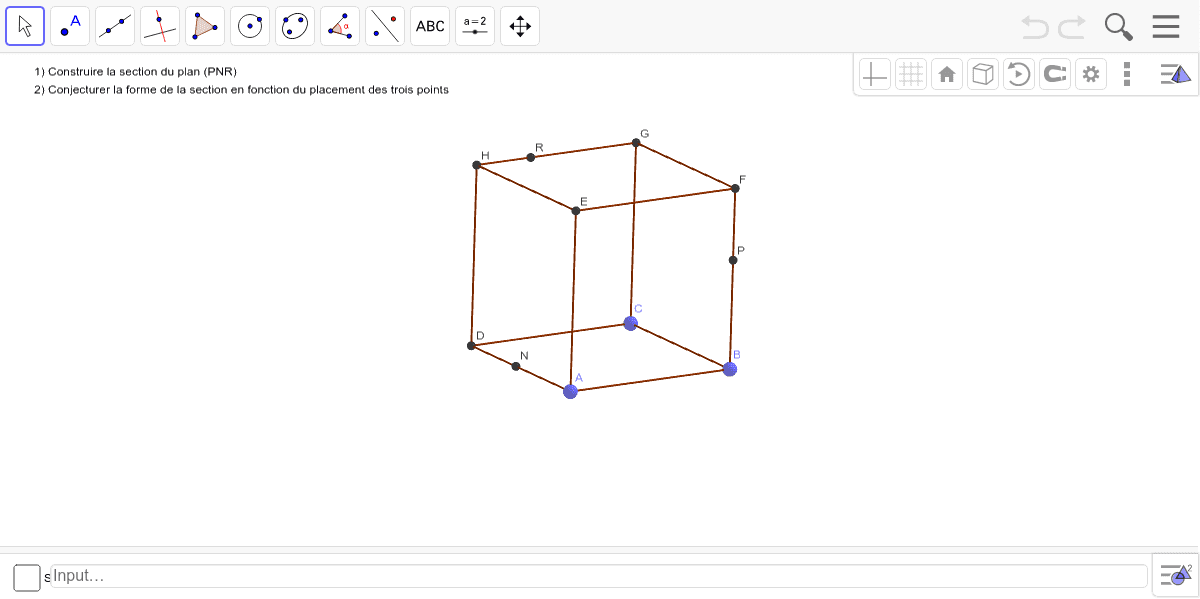
① This example demonstrates how a plane intersecting a cube produces a cross-section polygon, visualizing the concept of a plane section in solid geometry. ② Core mathematical concepts include spatial geometry, intersection of a plane with a polyhedron, and how the cross-section shape changes with the plane's orientation and position. ③ Construction details: Using GeoGebra commands such as Point to define cube vertices A through H, Cube to construct the cube, Plane to define the cutting plane, and IntersectPath to compute the intersection paths between the plane and each cube face, resulting in the section polygon poly1; edge objects like edgeAD, edgeAB, etc., help display the cube's edges, and interactive dragging or sliders allow dynamic adjustment of the plane. ④ Suitable for high school solid geometry or introductory university spatial geometry, this example aids students in understanding the relationship between cross-section shapes and plane orientation, enhancing spatial reasoning skills.
GeoGebra Commands & Parameters
Point(yAxis) → APoint(xAxis) → BPoint(Circle[B, Distance[A, B], Segment[A, B]]) → CCube(A, B, C) → a, D, faceCDHG, faceEFGH, edgeAD, edgeAB, edgeBC, edgeCD, edgeAE, edgeDH, edgeEH, edgeEF, E, edgeBF, edgeFG, edgeCG, edgeGH, F, G, H, faceABCD, faceADHE, faceABFE, faceBCGFPoint(faceEFGH) → IPoint(edgeGH) → JPoint(edgeBF) → LPoint(edgeAD) → MPlane(J, L, M) → bIntersectPath(b, a) → poly1, N, f, g, h, O, P, Q, R, S, c, d, e