
Scalar Product Demo
Loading the math board and drawing, please wait…
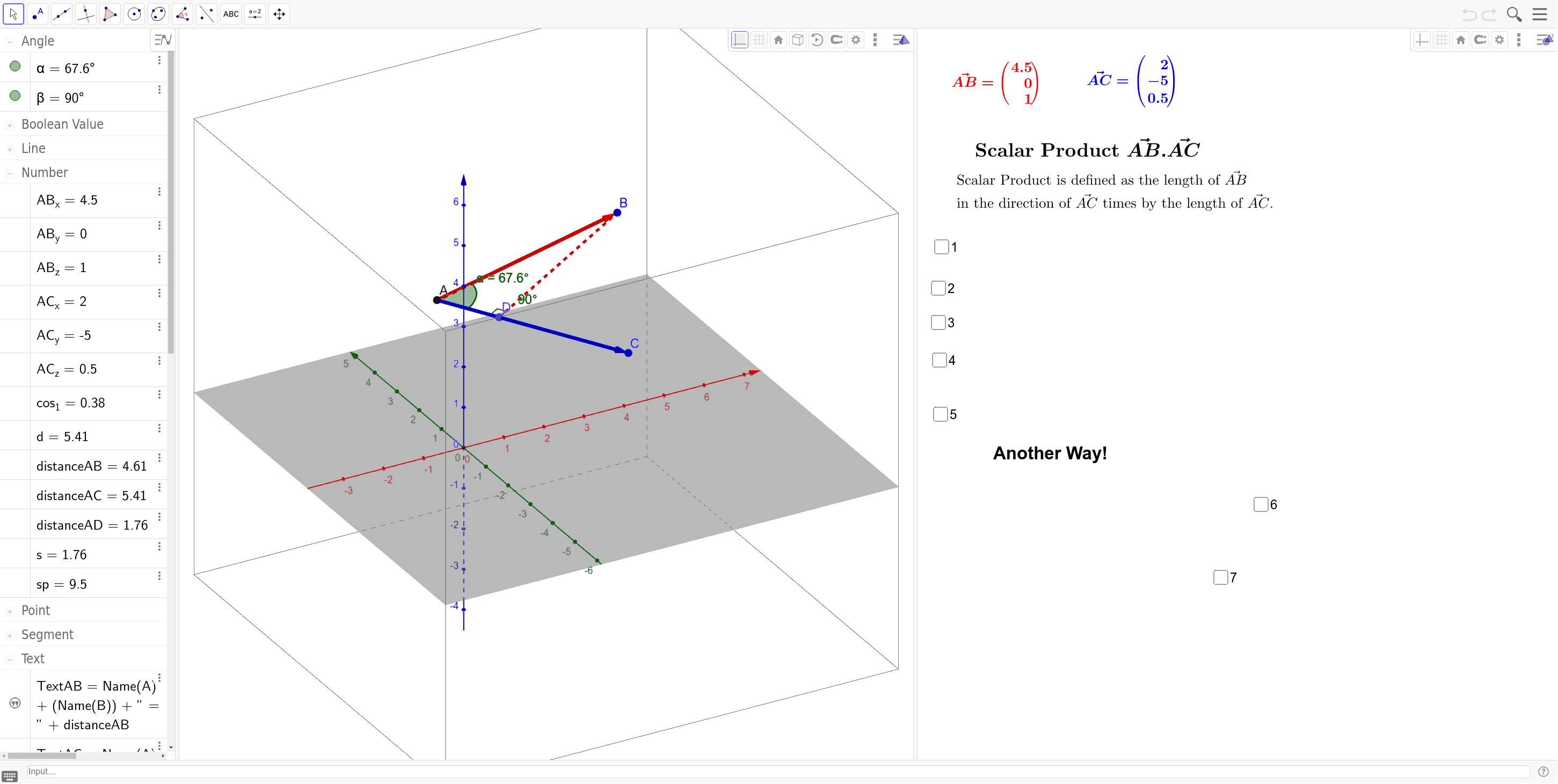
This example demonstrates the definition and application of scalar products, visualizing vector dot products for geometric understanding. Core math concepts include vectors, dot product, angles, and distances. GeoGebra commands and objects used are Line, OrthogonalLine, Intersect, Vector, Angle, Distance, Segment. Suitable for high school and above students to enhance comprehension of vector operations and analytical geometry.
GeoGebra Commands & Parameters
Line(A, C) → aLine(A, B) → bOrthogonalLine(B, a, space) → cIntersect(c, a) → DVector(A, B) → uVector(A, C) → vAngle(D, A, B) → αDistance(A, B) → distanceABDistance(A, C) → distanceACDistance(A, D) → distanceADSegment(B, D) → eAngle(A, D, B) → β
AI Drawing Prompt Reference
Draw a geometric figure with points A and C, a line segment from A to C, and a line through A and C. Construct a perpendicular line from point B to the line segment, then find their intersection point D. Show distances from A to B, A to C, and A to D, as well as a line segment from B to D. Also, label the angles between points A, D, and B to help understand vector and angle relationships.
The prompt above was compiled from the original drawing commands and is for reference only.