
SAS for Triangle Congruence
Loading the math board and drawing, please wait…
In collections
Triangle Congruence Criteria Visual Representations
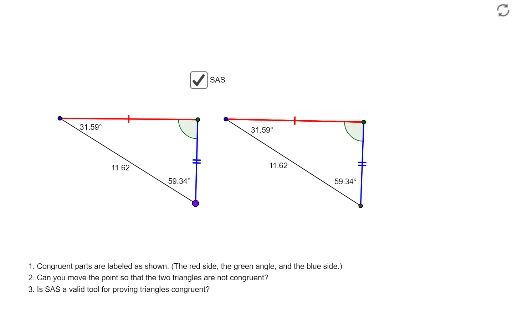
This example demonstrates the application of the SAS (Side-Angle-Side) criterion for triangle congruence. Key mathematical concepts include triangle congruence and the SAS criterion. Using GeoGebra commands such as Point, Segment, Rotate, Intersect, and Polygon, two triangles are constructed and their congruence is verified. Suitable for middle school and above students to learn about triangle congruence criteria.
GeoGebra Commands & Parameters
Point(Circle[A, abs(a)]) → BPoint(Circle[C, abs(a)]) → DAngle(A, B, J) → βSegment(B, J) → a_1Segment(A, B) → cSegment(C, D) → dRotate(C, β, D) → C'Angle(C, D, C') → γRay(D, C') → hCircle(D, a_1) → fIntersect(f, h) → E,Polygon(C, D, E) → poly2, e_1, c_2, d_2Angle(E, C, D) → εAngle(D, E, C) → ηPolygon(A, B, G) → poly3, g_1, a_2, b_2Circle(D, a_2) → kAngle(B, A, G) → θRotate(D, (-θ), C) → D'Angle(D', C, D) → ιRay(C, D') → iIntersect(k, i) → H, IPolygon(C, H, D) → poly4, d_3, c_3, h_1Polygon(C, D, I) → poly5, i_1, c_4, d_4Angle(A, J, B) → ζAngle(J, A, B) → δSegment(A, J) → eSegment(I, D) → b
AI Drawing Prompt Reference
Draw two triangles, ABC and CDE. First, draw circles centered at points A and C with radius a, and find points B and D on the circles. Then, draw a segment of length a starting from point B and a segment of length d starting from point C. Rotate point C by angle β to get point C'. Next, draw triangle CDE, then rotate point D by -θ to get point D', and draw triangle CDI. Ensure that both triangles satisfy the SAS condition, i.e., two sides and the included angle are equal.
The prompt above was compiled from the original drawing commands and is for reference only.